Meta description: Zendesk handling PHI? Use this HIPAA compliance software checklist to lock down access, document controls, and reduce audit risk.
Your Zendesk contains PHI. A signed BAA with Zendesk doesn't make the setup compliant by itself. Primary risk sits in your config, your user lifecycle, your integrations, and the proof you can produce when someone asks how access was controlled last quarter.
That gap matters more than expected. One inactive admin, one over-permissioned agent, or one forgotten integration token can expose protected data and leave you scrambling for evidence after the fact. The bigger problem is that many teams focus on controls and skip documentation. As one review of common HIPAA checklist gaps puts it, OCR cares as much about proof of compliance as compliance itself, which is exactly where many Zendesk environments fall short in practice, according to Affant's review of HIPAA checklist blind spots.
Use this hipaa compliance software checklist as an operator's audit pass, not a legal memo. If you need broader operational support around infrastructure and managed services, it's also worth reviewing how teams approach managed IT for HIPAA compliance. For Zendesk admins, the point is narrower. You need controls that work in production and records that prove they were working.
1. Role-Based Access Control and User Authentication
Most Zendesk HIPAA problems start with lazy permissions. Someone gets admin because it's faster. A temp agent keeps access after a project ends. Billing staff can see fields they never need. That's how a clean policy turns into a messy real system.
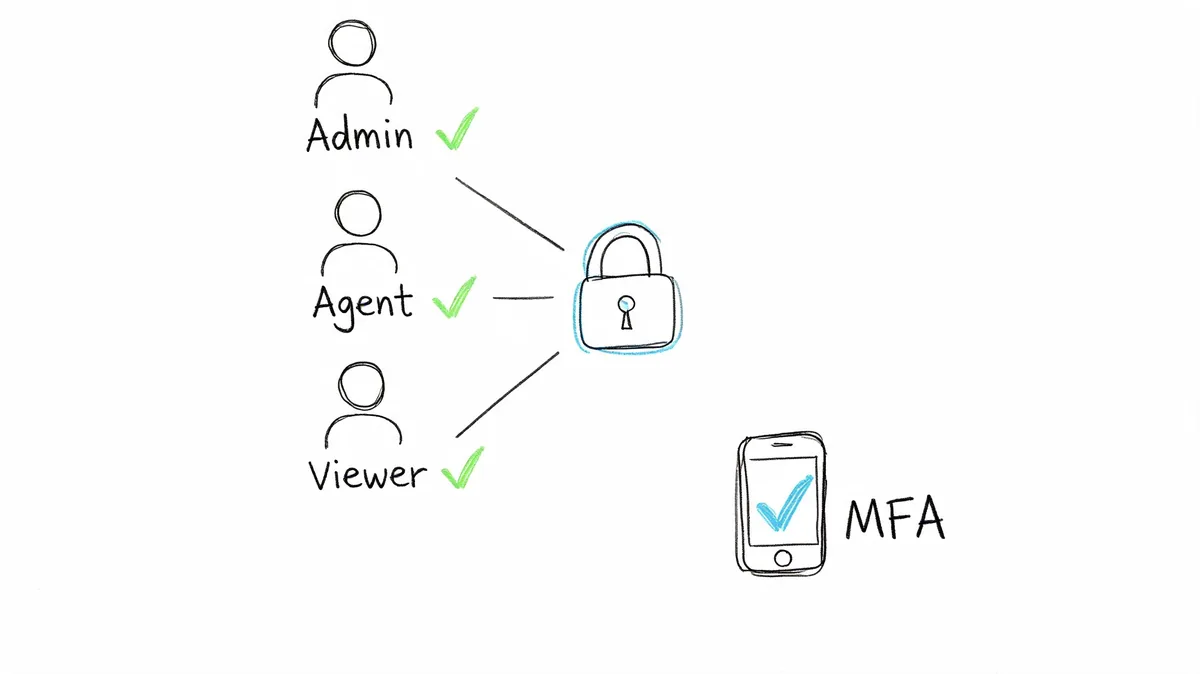
Zendesk gives you enough to avoid that. Native roles, custom roles, SSO, and MFA are all useful, but only if you map them to actual job duties and review them on a schedule.
What good RBAC looks like in Zendesk
A common pattern is to separate support operations from security administration. Your core support agents handle tickets. Team leads get limited management rights. Very few people hold full admin. If you use Okta or Azure AD for SSO, tie Zendesk role assignment to identity groups so access doesn't drift.
For healthcare workflows, role boundaries should track data boundaries. Billing staff may need insurance and payment details. They usually don't need clinical notes. Frontline agents may need customer history, but not export privileges or app management rights.
A few checks catch most of the trouble:
- Map roles to data types: Write down which roles can view ticket comments, custom PHI fields, user profiles, exports, and settings.
- Require MFA for privileged users: Don't stop at admins if agents can access PHI.
- Review role changes quarterly: Promotions, temporary projects, and contractor access create silent permission creep.
- Test custom roles after changes: One setting tweak can open more than you intended.
Practical rule: If you can't explain why a role has a permission in one sentence, remove it and add it back only if someone can justify it.
One useful side effect of cost governance is that it often exposes access problems. Inactive users are rarely just a finance issue. They're stale identities with retained permissions. If you're tightening Zendesk access, a good starting point is a clear rules-based access control approach for Zendesk. Even read-only tools should stay read-only, which is the right pattern for anything inspecting usage data in a PHI-sensitive environment.
2. Audit Logging and Continuous Monitoring
An auditor asks who exported a set of Zendesk tickets with PHI three months ago. If your team has to piece that answer together from screenshots, Slack threads, and partial admin history, the logging control failed long before the audit started.
For Zendesk, audit logging needs to answer a few plain questions fast. Who got access. Who changed permissions. Who created or used an API token. Who exported data. Which admin setting changed, and when. Keep those records long enough to support investigations and policy requirements, then make sure someone can retrieve them without a manual hunt.
Here is the operating mindset I recommend for Zendesk teams:
What to watch, not just what to store
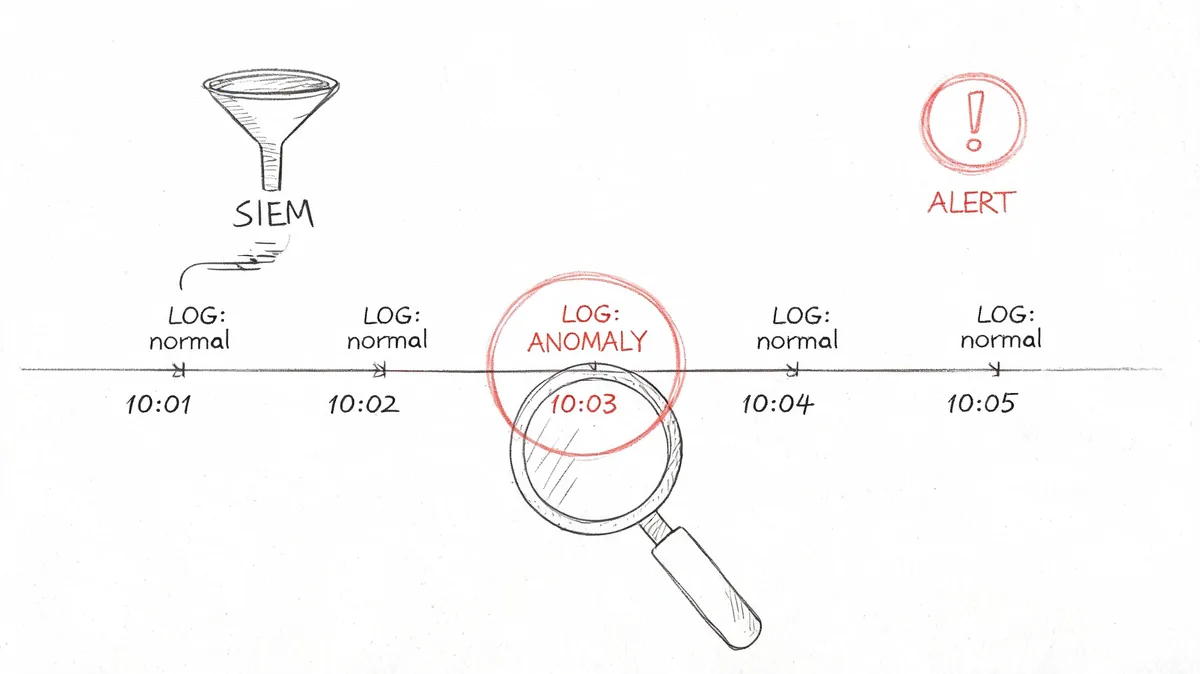
Store the logs, but build monitoring around the events that create real exposure in a Zendesk environment. I usually start with admin role assignment, SSO failures, unusual logins, bulk exports, app installs, webhook changes, API token creation, and configuration edits that affect ticket access or data flow.
If your team already runs Splunk, Sumo Logic, or another SIEM, send Zendesk events there with identity, endpoint, and cloud telemetry. Correlation is what turns isolated events into something actionable. A late-night export matters more if the same user was reactivated that day or logged in from a new location. Teams tightening both compliance and spend should also review SaaS security best practices because inactive accounts are often both wasted licenses and retained access paths.
A usable checklist looks like this:
- Log security-relevant admin activity: Role changes, app installs, token creation, webhook edits, SSO configuration changes, and export actions should all be captured.
- Set alerts for high-risk events: New admins, repeated failed logins, bulk ticket exports, and unusual API usage need prompt review.
- Keep logs searchable: You need timestamps, actor identity, object changed, and before-and-after context where possible.
- Review dormant users in the monitoring workflow: An inactive paid agent may be a cost issue. It may also be a stale account with PHI access, old tokens, or ownership of an automation nobody documented.
- Test retention and retrieval: Do not assume retention is working. Pull a dated event and verify your team can produce it on demand.
Teams often miss the operational aspect at this stage. They turn logging on, route alerts to a shared mailbox or stale Slack channel, and assume the control is covered.
After you set the alerts, test whether the team can respond.
Run a simple exercise. Disable a test user, create a mock export event, or change a non-production admin setting. Then verify four things. The event is logged. The alert fires. The right person sees it. The team can explain the response path without improvising.
That last step matters. Logs that nobody reviews are just stored evidence. Continuous monitoring means someone owns the queue, triages exceptions, and closes the loop when Zendesk changes introduce new risk.
3. Data Encryption In Transit and At Rest
A Zendesk instance can look secure right up until someone exports a ticket queue with attachments to a local desktop, syncs it into a BI tool, or sends PHI through an app that was approved for convenience, not for healthcare data. That is usually where encryption controls fail in practice.
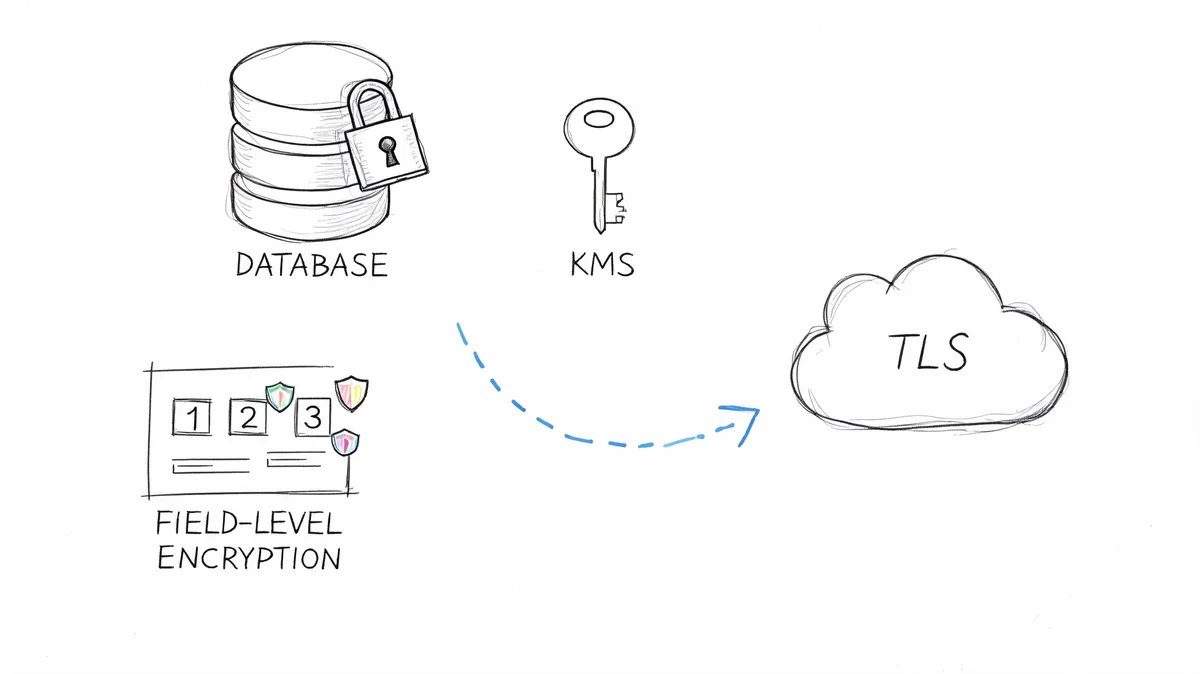
For HIPAA work, the useful question is simple. Can you trace every place PHI travels and confirm it stays encrypted in transit and at rest the whole way through? In Zendesk, that means checking more than the core service. It includes attachments, API traffic, webhooks, reporting pipelines, backups, and any support app that reads or stores ticket content.
The common failure point is the side system. Zendesk may protect the main workflow, but teams often create exceptions around it. Exports end up in shared drives. Attachments get copied into case notes in another platform. A connector pulls ticket data into a warehouse with weaker controls. Those are configuration and process problems, not vendor brochure problems.
Review the data path end to end. For each integration, confirm whether PHI is transmitted over TLS, whether the receiving system encrypts stored data, how encryption keys are managed, and whether the app keeps a copy longer than your team expects. If the answer is vague, treat that integration as a risk until someone can document it clearly.
A practical review usually includes these checks:
- Map every PHI flow: Include API integrations, ETL jobs, analytics tools, attachment storage, and backups.
- Verify encryption on both sides: Transport encryption is not enough if the destination stores unencrypted exports or cached records.
- Check key management: Know who controls the keys, where they are stored, and which admins can change that setup.
- Restrict export locations: Decide where CSVs and attachments are allowed to land, then block the informal alternatives.
- Prefer read-only integrations when possible: They reduce blast radius and lower the chance of accidental overwrites or broad data syncs.
- Review inactive app owners and unused agents: A dormant paid user may look like a licensing problem first, but it can also mean old API tokens, forgotten scheduled exports, or unattended access to PHI.
That last point is where cost control helps security. If you identify inactive Zendesk users during a license review, use that list to check for stale credentials, orphaned integrations, and old export jobs. The same cleanup effort cuts waste and closes exposure that would otherwise sit unnoticed. For connected systems outside Zendesk, these SaaS security best practices for connected tools are a good secondary check.
Trace the workflow, test the storage locations, and verify the exceptions. Encryption only protects the paths you use.
4. Access Control Lists and Data Minimization
Least privilege is easy to agree with and harder to run. In Zendesk, data minimization usually comes down to field visibility, ticket views, app access, and export rights.
A lot of teams keep too much PHI in too many places because it's convenient for agents. That's not a technical limitation. It's usually a process decision nobody revisits.
Reduce what each role can see
Start at the field level. If a custom field stores a diagnosis code, subscriber ID, or another sensitive detail, ask which roles need to see it. Then build views, forms, and app permissions around that answer. In a mixed healthcare support operation, scheduling staff, billing staff, and clinical operations staff should not all see the same ticket shape.
For multi-brand or multi-entity environments, organizations and groups help contain data, but they don't replace explicit visibility decisions. Macros can also leak data if they insert or expose more than an agent should handle.
A practical quarterly review looks like this:
- Trim visible fields by role: Hide sensitive custom fields from roles that don't need them.
- Limit export rights: Most agents don't need bulk data access.
- Review shared views and macros: These often expose more context than expected.
- Downgrade stale users fast: Inactive accounts increase both license waste and data exposure.
Here, cost optimization and compliance line up cleanly. If someone hasn't used Zendesk in a meaningful way, you should ask two things at once. Should you still be paying for the seat, and should that person still be able to see PHI? In practice, those decisions often belong in the same quarterly review.
5. Data Breach Response and Incident Management Plan
Every team says they have an incident process. Fewer teams can show what happens in the first hour after a Zendesk account is compromised.
Your plan needs named owners, containment steps, evidence preservation, communication paths, and a way to decide whether an event is a reportable breach. That sounds obvious until an actual alert hits and nobody knows who can revoke tokens, who informs legal, or who captures audit evidence before logs rotate out of easy access.
Build the Zendesk-specific playbook
Generic incident templates aren't enough. Your runbook should include Zendesk actions such as disabling user access, revoking sessions, checking recent exports, reviewing admin changes, and validating connected apps. If API tokens or OAuth grants are in play, include those too.
It also helps to separate security incidents from privacy incidents in the workflow, even if the same response team handles both. A suspicious login is one thing. Confirmed PHI exposure is another.
- Define triggers up front: Unusual login behavior, bulk exports, role escalation, and suspicious app activity should all have response criteria.
- Preserve evidence early: Save logs, access records, token history, and relevant ticket activity before cleanup starts.
- Assign owners by function: Security, Zendesk admin, compliance, legal, and communications each need a clear part.
- Run tabletop drills: A plan nobody has practiced is mostly paperwork.
For broader process design, these incident management procedures from Reclaim Security are a useful reference point. The Zendesk-specific part is what your team has to add. That's where speed and confusion usually decide whether the event stays contained.
6. Business Associate Agreements and Third-Party Risk Management
A Zendesk instance can look clean in an audit review and still have PHI flowing through tools nobody documented. The usual culprits are marketplace apps, BI connectors, transcript workflows, QA platforms, backup tools, and one-off internal scripts built to save time. If those tools can read, store, export, or transform ticket data, they belong in your HIPAA review scope.
For Zendesk admins, third-party risk management starts with a blunt inventory. List every integration that touches tickets, attachments, user profiles, side conversations, or APIs. Then mark which ones can access PHI, which ones have a signed BAA, who approved them, and who owns the vendor relationship. If you cannot answer those four questions quickly, the process is too loose.
A usable vendor register should include more than vendor name and contract date. Track the Zendesk connection point, data type accessed, whether the app writes data back into tickets, subprocessor exposure, renewal date, and internal owner. I also recommend a simple status field for "approved," "restricted," or "remove." That last category matters. Old integrations tend to linger after the team that requested them has moved on.
Cost review helps here. An inactive user or an unused app is not just wasted spend. In Zendesk, it often signals weak ownership, stale access, or an integration nobody has re-evaluated since implementation. That is why software spend reviews and HIPAA control reviews should share the same inventory.
A practical review cycle looks like this:
- Track every app with Zendesk access: Include marketplace apps, middleware, analytics tools, backup services, transcription tools, and internal scripts.
- Record BAA status in one place: Keep signature status, scope, renewal date, and business owner together.
- Check subprocessors before approval: If a vendor passes data to other providers, document that path before PHI enters the workflow.
- Review actual usage, not just contract status: Dormant apps and inactive vendor-owned accounts deserve the same attention as active tools.
- Flag read-only tools for review anyway: Read-only limits exposure, but the vendor still may process regulated data.
If you are building a tighter process, these vendor management practices for connected SaaS tools are a practical reference. Teams that route voice notes, call recordings, or dictated updates into support workflows should also vet whether the provider will sign a BAA and how transcript data is stored. WhisperAI - #1 AI Transcription services is one example of the questions to ask when transcription overlaps with Zendesk operations.
7. User Provisioning and Deprovisioning Controls
Bad offboarding is one of the most common avoidable risks in Zendesk. A rep changes departments and keeps support access. A contractor rolls off and the account stays active. An old admin is inactive but still licensed and still privileged.
That isn't just waste. It's a security hole you can usually fix with process discipline.
Tie identity events to Zendesk access
If your HRIS or identity provider already knows when someone joins, changes roles, or leaves, Zendesk shouldn't depend on a manual follow-up. Okta and Azure AD are common control points here. The more you can tie role assignment and removal to source-of-truth identity events, the less cleanup you'll do later.
Quarterly access reviews still matter. Automation catches the obvious path. It doesn't always catch the person who changed teams, the service account nobody documented, or the user who stayed assigned to the wrong group.
Most stale Zendesk accounts aren't malicious. They're neglected. Auditors and attackers both notice neglected access.
A tight operating routine looks like this:
- Automate onboarding where possible: Pull role and group assignment from your identity system.
- Disable fast, review second: Remove access promptly when employment or role status changes.
- Use inactivity as a control signal: An unused seat often points to missed offboarding or over-assignment.
- Re-certify access quarterly: Managers should confirm each person still needs the level they have.
For Zendesk teams, inactive-user reviews are one of the fastest wins because they hit cost, security, and audit readiness at the same time. You don't need a huge governance program to start there.
8. Workforce Security Training and Security Awareness Program
Monday morning. A supervisor asks why a discharged patient's lab report was attached to the wrong ticket, and the audit trail shows the agent used a macro that should never have included PHI in the first place. Zendesk did what it was configured to do. The failure was in training.
Security awareness for HIPAA work has to be tied to actual Zendesk tasks. Agents handle attachments, side conversations, macros, exports, and internal notes all day. Admins control apps, triggers, groups, and permission changes. Supervisors approve workflows and review exceptions. Each role creates different risk, so each role needs different instruction.
Train to Zendesk tasks people actually perform
For agents, the training goal is simple. Know where PHI is allowed, where it is not, and what to do when a ticket goes off script. Show examples of safe redaction, proper attachment handling, approved escalation paths, and when to move a conversation out of email. Generic phishing modules can still be part of the program, but they should not be the whole program.
For Zendesk administrators, focus on configuration decisions that expand exposure. App installs, API tokens, export permissions, macro edits, and group membership changes all deserve explicit training. If an admin can add an integration or widen access without understanding the PHI impact, the control set is incomplete.
Supervisors need a separate track. They are usually the ones approving exceptions, reviewing QA, and spotting repeated bad habits across a team. Train them to catch risky note-taking, unnecessary data collection, and workarounds that bypass approved channels.
A practical program usually includes these checkpoints:
- Build role-specific modules: Separate training for admins, agents, supervisors, and compliance owners.
- Use Zendesk examples: Base lessons on ticket fields, attachments, side conversations, macros, views, and exports.
- Tie retraining to change: New apps, updated workflows, or revised PHI handling rules should trigger targeted refreshers.
- Keep dated evidence: Store completion records, acknowledgments, and quiz results where they can be produced during an audit.
- Use audit findings to update training: If the same mistake appears in ticket reviews, revise the training and the workflow.
There is also a cost and security angle that Zendesk teams often miss. Inactive licensed users are a signal. If someone is still assigned a seat but has not worked tickets in weeks, check whether they missed retraining, changed roles without cleanup, or still have access they no longer need. The same review that cuts waste can surface weak ownership, stale permissions, and managers who are not confirming access or training status on time.
Treat training records like any other compliance evidence. If completion happened but no one can produce a dated record, the result is the same as no training at all. Auditors will ask for proof. Your own incident review should too.
8-Point HIPAA Compliance Software Comparison
| 🔄 Implementation Complexity | ⚡ Resource Requirements | 📊 Expected Outcomes | 💡 Ideal Use Cases | ⭐ Key Advantages |
|---|---|---|---|---|
| Role-Based Access Control (RBAC) and User Authentication, 🔄 Medium: policy design + SSO/MFA setup | ⚡ Moderate: IAM tools, MFA licenses, admin time | 📊 Strong access control and auditability; reduced PHI exposure | 💡 Organizations with diverse roles; use with read-only tooling (e.g., LicenseTrim) | ⭐ Enforces least-privilege, simplifies audits, enables fast offboarding |
| Audit Logging and Continuous Monitoring, 🔄 High: log collection, correlation, SIEM integration | ⚡ High: storage, SIEM, analyst expertise | 📊 High detection and forensic capability; compliance evidence | 💡 Large or regulated environments needing continuous oversight | ⭐ Improves detection, deters misuse, supports incident investigations |
| Data Encryption (In Transit and At Rest), 🔄 Medium: enable TLS/KMS and key policies | ⚡ Moderate: KMS/HSM costs, key rotation ops | 📊 Strong data confidentiality; reduced breach liability | 💡 Any system handling PHI and cross-system integrations | ⭐ Protects data in transit/at rest; supports HIPAA safe-harbor |
| Access Control Lists (ACLs) and Data Minimization, 🔄 Medium: field-level configs and ongoing tuning | ⚡ Low–Moderate: admin time to map fields and maintain rules | 📊 Reduced exposure/blast radius; enforces minimum-necessary access | 💡 Multi-role contact centers, multi-tenant Zendesk instances | ⭐ Limits visibility, lowers insider risk, prevents accidental exposure |
| Data Breach Response and Incident Management Plan, 🔄 High: cross-functional playbooks, drills, forensic workflows | ⚡ Moderate–High: legal, forensic, and exercise costs | 📊 Faster containment and clearer notifications; lower regulatory impact | 💡 Organizations that must meet breach-notification requirements | ⭐ Minimizes impact, demonstrates due diligence, clarifies responsibilities |
| Business Associate Agreements (BAAs) and Third-Party Risk Management, 🔄 Medium: contract negotiation and assessments | ⚡ Moderate: legal/procurement time, vendor audits | 📊 Contractual risk allocation and documented vendor obligations | 💡 Any third-party integrations or vendors accessing PHI | ⭐ Legal protection, enforces vendor security commitments |
| User Provisioning and Deprovisioning Controls, 🔄 Medium: HRIS/IdP integration and workflow automation | ⚡ Moderate: integration effort, approval workflows | 📊 Faster onboarding/offboarding; fewer orphaned or stale accounts | 💡 Dynamic or high-turnover workforces, automated environments | ⭐ Reduces stale access, improves audit trails, lowers exposure risk |
| Workforce Security Training and Awareness Program, 🔄 Low–Medium: develop and run role-based training | ⚡ Moderate: LMS/platform costs and time for simulations | 📊 Fewer human-error incidents; improved incident reporting | 💡 All PHI-handling staff; roles with frequent customer contact | ⭐ Cost-effective risk reduction; strengthens security culture and detection |
From Checklist to Continuous Compliance
Monday morning, a former contractor still has Zendesk access, a new app was connected on Friday, and your compliance lead needs proof of the last access review by noon. That is how HIPAA work usually shows up in a live Zendesk environment. Not as a policy problem, but as an ownership and evidence problem.
A HIPAA compliance software checklist only helps if it turns into routine operating work. Zendesk changes constantly. Agents go inactive, groups shift, permissions drift, marketplace apps get added, and screenshots saved for an audit disappear into someone's downloads folder unless you set a process for keeping them.
The teams that stay in control usually run a short quarterly review with three owners: Zendesk admin, security or IT, and compliance or operations. Keep it tight. Review active users, role changes, app inventory, audit log coverage, open exceptions, and where evidence is stored. Record decisions during the meeting, not a month later when nobody remembers why an admin role was approved.
If you are behind, start with user access. In Zendesk, that is usually the fastest way to reduce risk and cut waste at the same time. Inactive agent accounts, over-permissioned light agents, and old contractor logins create both compliance exposure and unnecessary spend. Cleaning those up is one of the few controls that improves security posture without a long implementation cycle.
Documentation needs to sit next to the control. If MFA is required, keep the export, admin setting, or IdP policy that shows it is enforced. If access is reviewed quarterly, save the dated review, the approval trail, and the removals that followed. If a vendor has a BAA, keep the agreement in the same register you use to track renewal dates, app owners, and PHI exposure.
Zendesk administrators can be more precise than a generic HIPAA checklist suggests. Do not just ask whether access reviews happen. Check which suspended users still hold paid seats, which groups have broad visibility they no longer need, which apps can read ticket data, and which exceptions have passed their review date. Those details matter in an audit, and they matter when you are trying to prove your controls operate.
Half-built controls cause more trouble than missing ones. A team may have MFA for employees but not for outsourced support. Audit logs may exist but not be retained in a way security can search. A deprovisioning workflow may work for full-time staff but miss temporary agents. Continuous compliance means finding those gaps early and fixing them on a schedule.
If you want a quick way to find one of the easiest HIPAA and cost-control wins in Zendesk, LicenseTrim helps you spot inactive agent accounts with read-only API access via OAuth. You can use that data to clean up stale seats, tighten access, and document governance decisions without changing anything automatically in your instance.