Your Zendesk renewal hits your inbox. The amount looks familiar, but not reassuring. You know some agents barely log in, some teams changed structure months ago, and at least a few seats were kept "just in case." You still have to approve the bill because nobody has a clean view of usage, contract terms, owner, and renewal date in one place.
That's the job of vendor management solutions. Not theory. Not procurement theater. They help you answer basic questions before money leaves the account: what you bought, who owns it, whether the vendor is meeting the contract, and whether you should renew at all.
For teams running Zendesk, that matters more than people admit. Support software renews without notice. Seat counts creep up. Admins inherit old setups. Finance sees one invoice line. Ops sees daily friction. Without a process, both sides are guessing.
What Are Vendor Management Solutions (And Why Bother)?

A vendor management solution is a system for keeping vendor decisions out of spreadsheets, inboxes, and memory. It gives your team one place to track vendors, contracts, spend, obligations, risk checks, and performance.
That sounds broad because it is. If you're managing Zendesk, your needs aren't the same as a manufacturing team buying raw materials or a hospital managing staffing vendors. But the core questions are the same:
- Who owns the vendor: One person needs to be accountable internally.
- What are we paying for: Contract value, billing terms, renewal rules, and seat commitments.
- Are we getting what we bought: Uptime, support response, security terms, service quality.
- Should we keep them: Renew, renegotiate, reduce scope, or offboard.
Without that system, teams patch together a process from shared drives, renewal reminders, and finance exports. That works until it doesn't. According to K&B Global's vendor management trends writeup, 65% of organizations depend on more than three vendors for IT needs, and 60% have experienced significant SLA breaches. More vendors create more handoffs, more missed follow-ups, and more chances for nobody to own the problem.
What a good system actually changes
The value isn't the software category itself. The value is control.
A decent setup lets your team:
- See the full vendor list: No more "I think marketing owns that tool."
- Track contract dates: Especially notice periods before auto-renewal.
- Store security and compliance records: SOC 2 reports, DPAs, questionnaires, approvals.
- Review performance over time: Not just whether the invoice got paid.
- Tie spend to usage: The first part is often completed, while the second is overlooked.
Practical rule: If your renewal decision happens after the vendor sends the invoice, you don't have vendor management. You have bill processing.
Where teams usually go wrong
The most common failure isn't buying the wrong platform. It's treating vendor management like a finance filing problem. Contracts get stored. Invoices get tagged. Then the work stops.
For SaaS vendors like Zendesk, that leaves a big gap. Your contract may be documented perfectly, while the seat count is still wrong. Your security review may be current, while your admin team still can't answer who used a paid license in the last month. A vendor management solution helps with visibility, but only if your process includes operational data, not just paperwork.
Here's the practical test. If you can't pull up a vendor record and answer the following in a few minutes, your process is still too manual:
| Question | What you should know |
|---|---|
| Contract owner | A named person, not a department |
| Renewal timing | Date plus notice window |
| Spend | Current committed cost and billing basis |
| Performance | Whether the vendor met agreed service expectations |
| Usage | For SaaS, whether paid seats are active or idle |
That's why teams bother. Not because vendor management is fashionable, but because waste, risk, and bad renewals are expensive when nobody has the full picture.
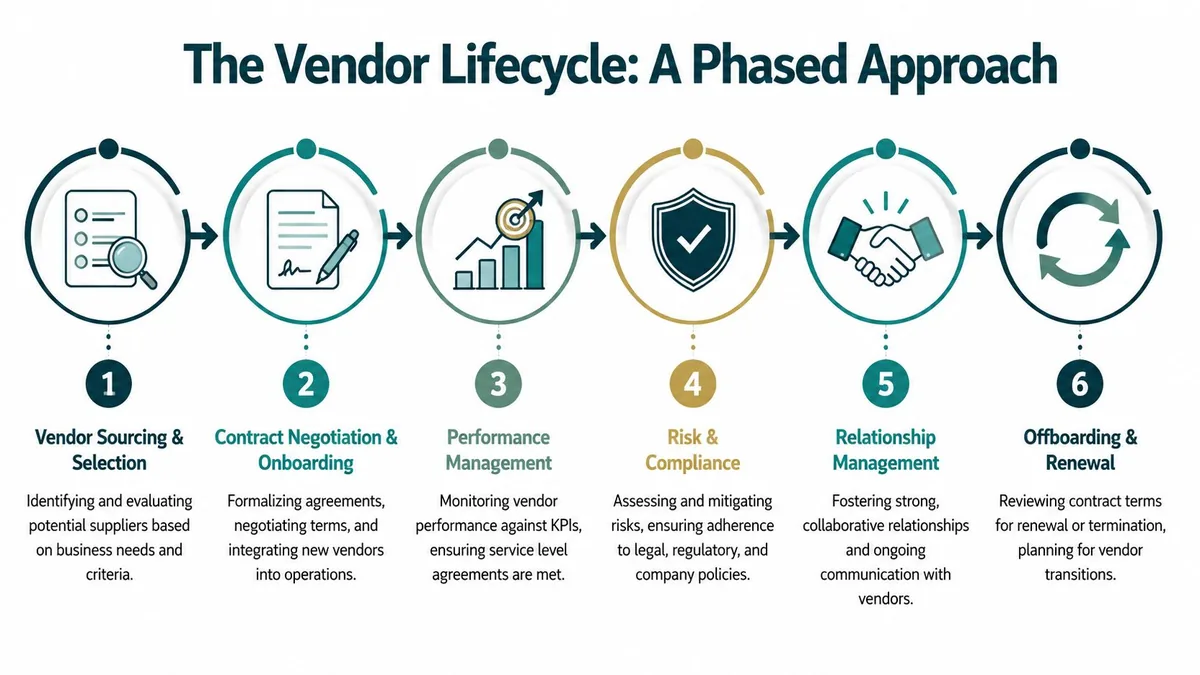
The Vendor Lifecycle A Phased Approach
Vendor management works best when you treat it as a cycle, not a filing cabinet. The strongest teams use the same structure whether they're choosing a new payroll tool, reviewing a managed service provider, or renewing Zendesk.
The market has grown around that need. The Research and Markets vendor management software forecast estimates the global market at USD 10.12 billion in 2025 and projects it will reach USD 17.66 billion by 2030, with a CAGR of 11.79%. Teams aren't buying these systems for decoration. They're buying them because vendor sprawl keeps getting harder to manage.
For a broader operating model, it's worth reviewing these IT vendor management best practices. The lifecycle below is the version that tends to hold up in real work.
Vendor sourcing and selection
Start here before demos and pricing calls. Organizations often rush into vendor selection with fuzzy requirements and too many opinions.
Get clear on:
- Business need: What problem has to be solved
- Must-haves: Security, integrations, reporting, admin controls
- Commercial limits: Budget, billing model, seat flexibility
- Internal owner: Who will run the tool after purchase
Selection goes wrong when the buyer only evaluates features. The better filter is operational fit. For Zendesk-related tools, that includes API access, role controls, auditability, and how much manual admin work the tool removes.
Contract negotiation and onboarding
A signed order form isn't the finish line. It's where future pain gets locked in.
Focus on the terms your team will care about later:
| Phase | What to lock down |
|---|---|
| Contracting | Renewal terms, notice windows, pricing basis, support commitments |
| Onboarding | Admin access, implementation owner, data requirements, internal handoff |
If the renewal clause is buried, you'll feel it later. If ownership isn't clear, the tool becomes "someone else's system" by month two.
Performance management
Weak vendor programs fade out when teams spend time picking vendors, then stop measuring them.
For software vendors, performance usually includes uptime, support response, issue handling, and product reliability. For service vendors, it may be delivery against milestones, quality of work, and budget adherence.
Good vendor management is boring on purpose. The process should make it hard to forget a review, miss a deadline, or renew on habit.
Risk and compliance
Every vendor carries some mix of legal, security, operational, and financial risk. The mistake is treating risk review as a one-time gate at purchase.
For practical teams, risk review usually includes:
- Security checks: Data handling, access methods, compliance documents
- Legal terms: DPA, privacy terms, indemnity, data retention
- Operational dependency: What breaks if the vendor fails
- Concentration risk: Whether one vendor has too much control over a workflow
A Zendesk admin may not own all of this, but your team will still feel the fallout if it's skipped.
Relationship management
Not every vendor needs white-glove treatment. Some just need clean billing and a support queue. Others deserve regular review because they affect customer experience, security, or a large chunk of budget.
The practical move is to tier vendors. A tool tied to support operations gets a tighter review cycle than a low-risk utility app with limited spend.
Offboarding and renewal
Renewal decisions should be evidence-based. Offboarding should be planned before the relationship gets messy.
Check the full picture:
- Usage reality: Are teams still using what they bought
- Performance history: Did the vendor hold up
- Risk status: Any unresolved security or compliance issue
- Commercial fit: Can you reduce seats, switch tiers, or exit cleanly
Plenty of teams are disciplined at buying and sloppy at renewing. That's where cost leaks start.
Evaluating Vendor Management Solutions What to Look For
A demo rarely fails in the first half hour. The problems show up six months later, when a renewal is coming up, no one owns the record, the contract is buried, and the finance team still cannot tell whether the spend matches real usage.
That is the standard to use in evaluation. Do not score a platform by how polished the dashboard looks. Score it by whether it helps your team control cost, assign ownership, and make cleaner renewal decisions.
Start with control, not feature count
A vendor management system has to hold up under routine operational work. If the basics are weak, the rest turns into shelfware.
Look for:
- Structured vendor records: owner, department, category, status, renewal terms
- Contract storage: searchable documents, version history, and clear access controls
- Approval workflow: enough structure to prevent chaos without forcing every request through procurement
- Spend visibility: committed spend, billing terms, and renewal timing in one place
I have seen plenty of tools that can store data but cannot keep it clean. That creates predictable mess. Duplicate vendors, missing owners, PDFs with no searchable terms, and renewal dates that live in someone's calendar instead of the system.
Performance tracking should help you act
A good platform does more than preserve notes from old meetings. TechnologyMatch's IT vendor management playbook highlights continuous performance tracking against defined KPIs with automated alerts. That matters because teams usually notice vendor issues after support slips, implementation drags, or invoices stop matching expectations.
The practical question is simple. Can the system show that a vendor is drifting before the renewal discussion starts?
Core capabilities of vendor management solutions
| Capability | What It Does | Why It Matters for Ops & IT |
|---|---|---|
| Central vendor database | Stores vendor records, owners, documents, and status | Stops ownership confusion and scattered records |
| Contract management | Tracks terms, dates, notice periods, and obligations | Prevents missed renewals and bad commercial surprises |
| Performance monitoring | Tracks KPIs, SLAs, and alerts | Helps teams act before service quality slips |
| Risk and compliance | Stores reviews, questionnaires, and policy checks | Keeps security and legal work attached to the vendor record |
| Spend analytics | Shows contract value and vendor-level spend | Helps finance and ops see concentration and cleanup opportunities |
Use the table during demos. Ask the vendor to show how each workflow works with real data, not sample records.
Questions worth asking in a demo
Good demo questions force the platform to deal with the messy parts of vendor management:
- Can we assign one clear internal owner for each vendor?
- Can we track auto-renewal notice windows, not just contract end dates?
- Can teams outside procurement add operational context without weakening controls?
- Can the system alert us when reviews are overdue or service levels slip?
- Can we separate vendor-level spend from product-level usage?
That last point matters more than many VMS buyers expect.
A general vendor platform may tell you that Zendesk renews in 90 days and costs a set amount per year. It may not tell you whether paid seats are sitting unused, whether your license mix is wrong, or whether a department kept buying while adoption flattened. For SaaS-heavy companies, that gap is where a lot of waste hides. That is also why teams often pair a core VMS with more focused SaaS spend management tools that can see license-level activity.
If the vendor's answer is "you can export it to Excel," your team will be doing the real work outside the system.
Match the workflow to your operating model
Some platforms are built for large procurement teams with formal intake, layered approvals, and frequent supplier reviews. That can be the right fit for a complex enterprise. It is a bad fit for a lean operations or IT team that needs usable controls and cannot afford to babysit the tool.
What tends to work for mid-market teams is a system with:
- Repeatable assessment templates
- Straightforward document collection
- Review schedules based on vendor criticality
- Visible exception handling
- Simple reporting that supports renewal decisions
The trade-off is real. A lighter tool is easier to adopt but may leave gaps in governance. A heavier tool can cover more scenarios but often loses participation outside procurement. The right choice depends on who will maintain the records every week, not who signs the software order form.
Analytics matter if they change a decision
Advanced reporting is useful when it helps the team renegotiate, consolidate, or cancel. If it only produces attractive charts, it has limited value.
Treat analytics the same way you treat every other feature. Ask what action it supports. Can it surface duplicate vendors, show spend by owner, flag upcoming renewals with poor performance history, or expose categories where usage and commitment no longer match? If it cannot help your team reduce cost or improve control, it should not carry much weight in the buying decision.
The Hidden Cost Traditional VMS Misses SaaS Licenses
A renewal meeting goes sideways when finance asks a simple question: why are we paying for 100 Zendesk seats if only 82 people logged in last month? A traditional VMS usually cannot answer that. It can show the contract, the owner, the approval trail, and the renewal date. It usually cannot show whether the licenses inside that contract still match how the team works.
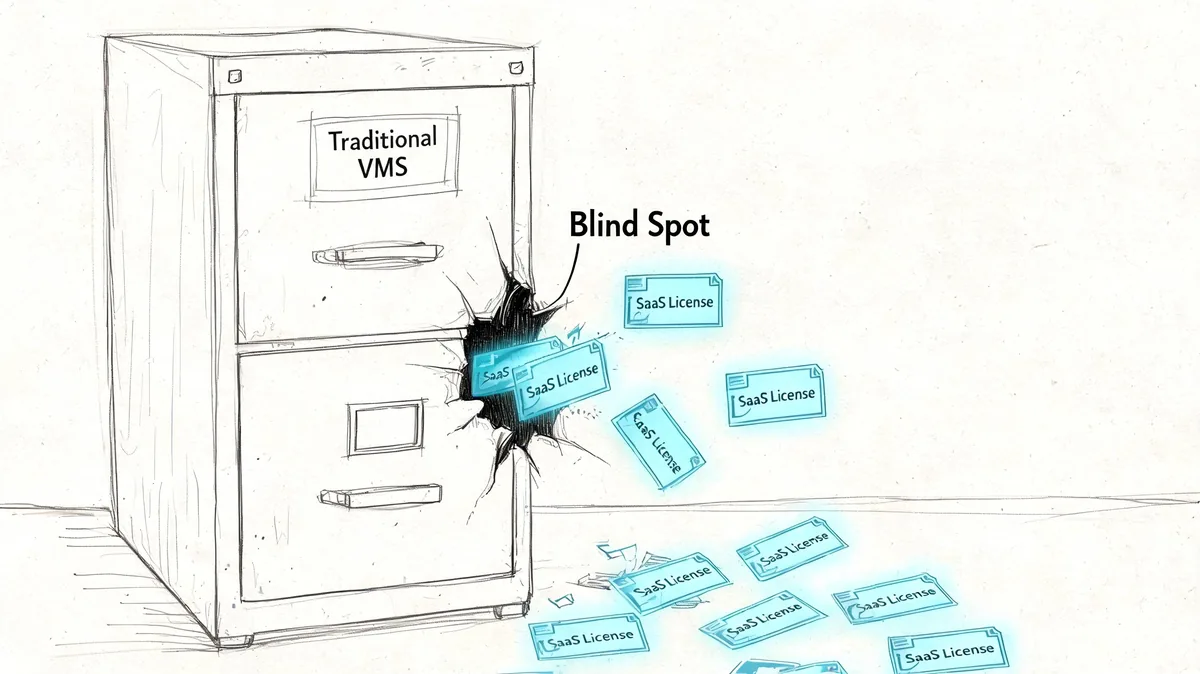
That gap is expensive. The SpendMend vendor management page noted that global SaaS spending hit $197 billion in 2025 and that 30 to 40 percent of licenses remain underused. A contract repository will not catch that on its own.
Why general-purpose VMS tools miss it
General VMS platforms were built to manage the vendor relationship, not day-to-day product usage. They are good at keeping the commercial record straight:
- Contract and invoice tracking
- Renewal dates and notice periods
- Risk and compliance records
- Approval history and ownership
What they usually lack is visibility inside the application. For Zendesk, that means they cannot tell you which agents stopped using the tool, whether a team is overprovisioned after a reorg, or whether license levels drifted away from actual support volume.
That is not a flaw in the category. It is a scope limit.
Why manual audits break down
Teams often try to cover the gap with exports, spreadsheets, and a quick admin check before renewal. I have seen that work once or twice. I have not seen it hold up for long, especially when staffing changes monthly and ownership is split across IT, support, and finance.
| Approach | What happens in practice |
|---|---|
| Spreadsheet audit | Falls out of date as soon as headcount, roles, or teams change |
| One-time admin review | Finds obvious waste, then misses the same problem six months later |
| Finance-only review | Sees the bill, not whether people are active in the app |
| Contract-only VMS review | Confirms terms and dates, not whether paid seats are idle |
Your contract shows what you agreed to buy. Usage data shows whether you should keep buying it.
That distinction matters more with SaaS than with many other vendor categories because waste can hide under a valid contract for months. The invoice is approved. The vendor record is complete. The spend still should have been lower.
For Zendesk and similar tools, the practical fix is to pair systems instead of forcing one tool to do both jobs. The VMS should hold the vendor record, renewal workflow, and commercial history. A SaaS license management tool should provide the usage evidence, inactive seat data, and cleanup opportunities that support a better renewal decision.
Calculating the ROI of a Vendor Management Program
A renewal notice lands on Friday afternoon. Finance wants a number by Monday. The fastest way to lose that conversation is to pitch vendor management as cleaner process. The case that gets approved is simpler. Show where money leaks today, show what control fixes it, and keep the math conservative.
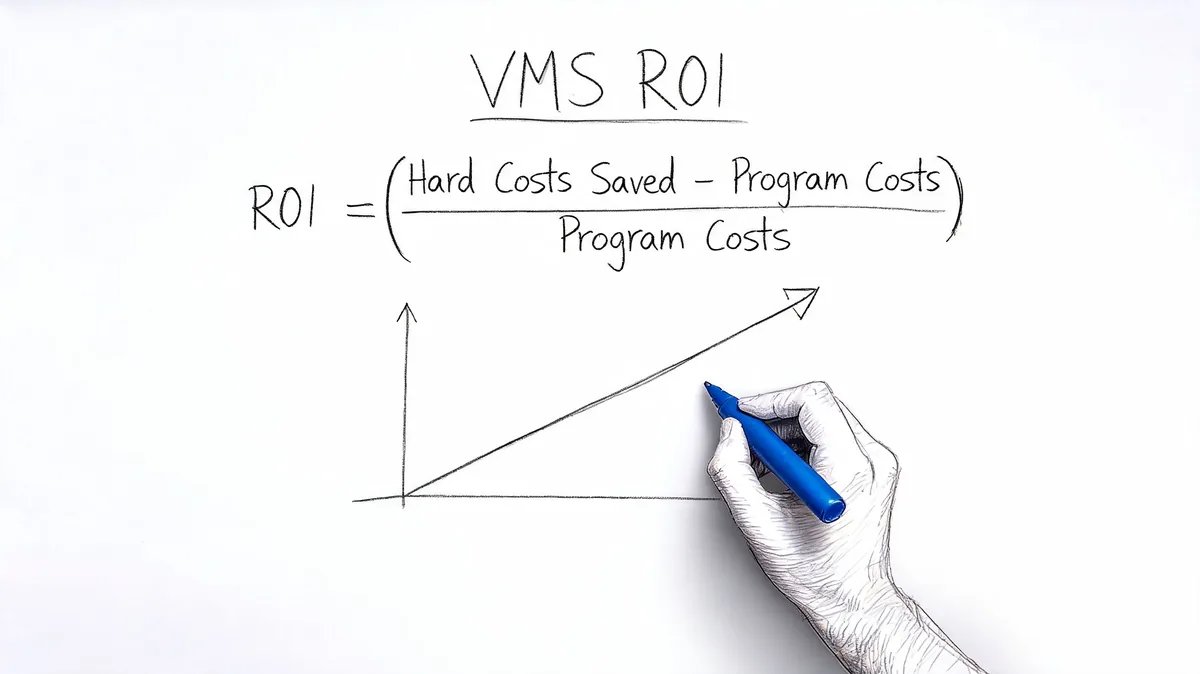
A practical ROI formula looks like this:
ROI = hard cost savings + avoided risk costs + admin time recovered - tool cost
Start with spend you can verify now. In SaaS-heavy environments, license waste usually gives you the cleanest first win, especially in tools like Zendesk where paid seats can sit idle while the contract still looks fine on paper.
A quick Zendesk example
Say your team has 100 agents on Zendesk Suite Professional at $115 per agent per month, based on the pricing provided in your brief.
If you find 15 inactive agents, the math is direct:
| Item | Calculation | Amount |
|---|---|---|
| Monthly wasted spend | 15 x $115 | $1,725 per month |
| Annual wasted spend | $1,725 x 12 | $20,700 per year |
That is real savings, not a modeled forecast. You are paying for seats nobody needs.
The broader point matters more than the single example. Traditional VMS reporting often captures the contract, renewal date, and owner. It does not always show whether named users are active, whether licenses match current staffing, or whether a team is carrying a higher tier than it uses. That gap is why SaaS license management belongs in the ROI model. It adds evidence a standard vendor record usually cannot provide.
Manual review has a cost too. Someone has to pull exports, compare user lists, check with managers, document changes, and repeat the exercise before each renewal. In smaller teams, that work lands on an admin or systems lead. In larger companies, it gets split across IT, finance, procurement, and department owners, which often means nobody sees the full picture.
Add the value of timing
The second ROI layer comes from acting early enough to change the outcome. If your team reviews vendors before the notice window closes, you can cut seats, change plan levels, or challenge pricing while you still have options.
That timing benefit applies beyond SaaS licenses. A disciplined vendor program also helps teams catch weak service levels, pricing drift, and low-value renewals before they roll into another term. As noted earlier, more advanced VMS tools can also support earlier intervention with trend analysis and alerts. The point for ROI is simple. Better timing reduces avoidable spend.
A short explainer on the business case helps when you need internal buy-in:
What to include in your own model
Use a simple version first:
- Seat cleanup savings: Licenses you can remove, downgrade, or reassign
- Avoided over-renewal: Products, add-ons, or seat counts you stop carrying into the next term
- Admin time recovered: Hours no longer spent chasing spreadsheets, exports, and dates
- Reduced disruption risk: Downtime, rushed renewals, or last-minute approvals that create extra cost
Keep the assumptions tight. If the ROI works with conservative numbers, the program is probably worth doing. If the savings only appear after aggressive guesswork, the model needs more proof.
Implementing Your Vendor Management Program
Most vendor programs fail in setup, not strategy. The problem isn't that teams don't agree with the idea. The problem is that nobody wants to own the cleanup work.
Phase one gets alignment
Start with a small working group. Usually that means someone from finance, someone from IT or systems, and one operator from a department with real vendor spend.
Keep the first policy short. Define:
- Who can buy or renew vendors
- Who owns each vendor internally
- What records must be stored
- When renewals must be reviewed before approval
Don't overbuild it. A one-page policy people follow is better than a polished document nobody reads.
Phase two gathers the messy data
The practical reality often becomes apparent: Contracts are in inboxes. Renewal notices went to former employees. Finance has vendor names that don't match the product brand. IT knows the admin login, but not the contract term.
Get the basics into one list first:
| Field | Why it matters |
|---|---|
| Vendor name | Creates a clean master record |
| Internal owner | Gives accountability |
| Product or service | Distinguishes platform from vendor umbrella |
| Renewal date and notice period | Drives action timing |
| Contract file | Lets you verify what was actually signed |
Once you have that, you can clean the edge cases later.
Start with your highest-cost and highest-dependency vendors. You don't need every small app documented before you fix the expensive renewals.
Phase three builds adoption
Roll out the process with a few important vendors first. Zendesk is usually a good candidate because it has visible cost, multiple stakeholders, and direct operational impact.
For the pilot, make sure people can do three things without friction:
- Find the vendor record
- See the renewal timeline
- Pull the usage or performance evidence needed for a decision
If your process makes those tasks harder, people will route around it. That's when shadow spreadsheets come back.
Training shouldn't be a big event. A short walkthrough for owners, approvers, and admins is enough if the workflow is clear.
A Vendor Management Checklist for Your Next Renewal
Renewals go better when your team reviews facts before the vendor starts the sales motion. Use this checklist a few weeks before any meaningful contract decision.
Renewal checklist
- Confirm the internal owner: One person should coordinate the review and collect feedback.
- Pull the contract terms: Check renewal date, notice window, seat commitments, and billing rules.
- Review actual usage: For SaaS tools like Zendesk, compare paid seats with real activity.
- Check service performance: Look at uptime, support responsiveness, and unresolved issues.
- Review risk status: Make sure security and compliance records are still current.
- Ask finance for current spend: Match invoices to the contract, not assumptions.
- Get stakeholder input early: Support, IT, finance, and the system owner should all weigh in before vendor contact.
- Decide your position first: Renew as-is, reduce scope, renegotiate, or replace.
- Log the deadline visibly: If auto-renewal is in play, treat the notice date as the actual deadline.
- Track the outcome in one place: Your future self shouldn't have to reconstruct the decision from email.
A dedicated renewal management software guide can help if renewals are your biggest operational gap.
For Zendesk teams, the key addition is usage proof. General vendor records tell you what you bought. Renewal discipline tells you when to act. Usage data tells you whether you're still paying for the right number of seats.
If you're trying to cut Zendesk waste before your next renewal, LicenseTrim gives you the missing usage layer. It connects to Zendesk with read-only access, finds inactive agents, and shows how much money is tied up in unused licenses so you can make a clean renewal decision.