Meta description: SaaS risk management for Zendesk starts with finding waste, access gaps, and risky apps before renewal. Use this practical audit playbook.
You open the Zendesk renewal quote and the number looks wrong.
Not slightly wrong. Wrong enough that you start scanning the agent list, line by line, and notice names you haven't seen in months. A few changed teams. A few left the company. One account belongs to a contractor who finished last quarter. The bill kept going anyway.
That’s saas risk management in real life. It’s not a policy document. It’s the moment you realize your Zendesk account has become a mix of active users, stale access, connected apps, and hidden spend. The cost problem is the one you feel first. The security and compliance problems usually sit right behind it.
That Surprise Zendesk Renewal Notice
The renewal shock usually starts with cost, but cost is only the symptom.
A bloated Zendesk instance tells you something else is off. User lifecycle controls are weak. App approvals are loose. Nobody owns periodic cleanup. Access drifts over time because day-to-day work wins and cleanup work gets pushed out.

That’s why I treat renewals as audit triggers. If your seat count climbed and you can’t explain every paid agent quickly, you probably have the same problem in other places too. Marketplace apps. Old API tokens. Broad admin roles. Groups and views that still reflect last year’s org chart.
The warning signs show up before the bill does
You can usually spot the pattern early:
- Dormant agents remain paid: The account still exists because nobody tied offboarding to license review.
- Admins pile up over time: A temporary exception becomes permanent access.
- Apps stay connected forever: The integration solved one problem once, then never got reviewed again.
- Finance gets the invoice, not the context: By the time procurement asks questions, the waste is already baked in.
Security teams see the same drift from another angle. According to AppOmni’s 2025 SaaS security findings, 75% of organizations experienced at least one SaaS-related security incident in 2025, a 33% increase from 2024. That matters here because many of those incidents come from unmanaged apps and poor access controls, not from some exotic zero-day.
Practical rule: If you can’t explain who needs a license, who owns an integration, and who can export data, you don’t have control. You have drift.
Zendesk makes this easy to miss because it’s operational software. It feels familiar. People log in every day, tickets move, customers get answers, and the platform appears healthy. Meanwhile, the risk sits in the background. An inactive seat wastes budget. An over-permissioned agent expands your blast radius. An old integration keeps access long after the original project ended.
What the renewal should tell you
Treat the renewal notice as a forced inventory event.
You’re not just checking whether the price went up. You’re checking whether your Zendesk environment still matches your actual team, your current workflows, and your current security expectations. If it doesn’t, the fix isn’t to negotiate harder. The fix is to clean house before you sign.
What SaaS Risk Management Actually Means for You
Most write-ups make saas risk management sound bigger than it is. For a Zendesk admin or IT manager, it comes down to three questions.
What do you have. Who can use it. What data can it touch.
If you can answer those three questions with confidence, risk drops fast. Not to zero, but enough that you stop getting surprised by invoices, access reviews, and odd app behavior.
It’s a business practice, not a one-time project
A lot of teams treat SaaS risk like an annual cleanup. They run a spreadsheet review before renewal, remove a few accounts, then move on. That works for about a month. After that, hires, role changes, temporary projects, and app installs start pushing the environment out of shape again.
The better approach is boring and repeatable. Keep an inventory. Review access on a schedule. Check usage before you approve more seats. Review integrations before they become permanent. If you want a broader view of how teams handle that discipline across tools, this guide to SaaS software management is a useful companion.
Visibility without control doesn’t help much
People often say they have visibility because Zendesk has logs, audit trails, and admin reporting. That’s useful, but it’s not enough on its own.
You need visibility tied to action:
| What you can see | Why it matters | What to do with it |
|---|---|---|
| User last sign-in | Flags inactive paid seats | Review for downgrade or removal |
| Role assignments | Shows admin creep | Reset to least-privilege roles |
| Connected apps | Reveals third-party access | Review scopes and remove unused apps |
| API tokens | Exposes machine access | Rotate, restrict, or revoke old tokens |
| Ticket exports and data access | Surfaces sensitive data exposure | Limit who can access or export |
That’s the working model. Visibility + control = reduced risk. Visibility alone just gives you a better view of your problem.
SaaS risk management works best when it becomes part of ordinary admin work, not a separate security initiative that nobody has time to run.
What “good” looks like in practice
For most mid-market teams, good doesn’t mean perfection. It means:
- Known inventory: You know which core apps and integrations are active.
- Named owners: Each important app has someone accountable for access and spend.
- Regular reviews: Licenses, roles, and integrations get checked on a schedule.
- Fast offboarding: When someone leaves, tool access changes quickly.
- Renewal readiness: Finance doesn’t have to guess what should be renewed.
You don’t need to become a SaaS security specialist to do this well. You need habits that stop drift before it becomes cost, exposure, or cleanup work.
The Four SaaS Risks Lurking in Your Zendesk Account
When a Zendesk environment gets messy, the problems usually fall into four buckets. Security. Compliance. Financial waste. Operational drag.
They overlap. An unused account is a cost problem first, then a security problem if it still has access. A marketplace app is an operational shortcut first, then a data exposure problem if nobody reviews its permissions.
Security risk
The biggest security problem in SaaS is still identity.
A single compromised identity can open far more than one screen or one queue. In Zendesk, that might mean access to tickets, customer data, internal notes, macros, exports, and connected systems. The Mitiga guidance on securing SaaS makes the point clearly. A compromised agent account can become an attacker’s gateway into the customer service environment, and enforcing MFA is one of the most effective controls against account takeover attempts that rely on stolen credentials alone.
Security risk in Zendesk usually shows up in a few familiar ways:
- Weak identity controls: Agents sign in without MFA or through poorly governed exceptions.
- Admin creep: Team leads or temporary project owners keep advanced permissions.
- Old API tokens: Integrations continue to run with broad access long after setup.
- Third-party app exposure: Marketplace apps get approved once and never reviewed again.
Don’t focus only on login security. Review what each account can do after login.
The trap here is assuming Zendesk secures all of it for you. Zendesk secures the platform. You still own your user access, your role design, and your app permissions.
Compliance risk
Support teams handle messy, sensitive, real-world data. Customers paste in names, addresses, payment references, screenshots, and details they shouldn’t send but often do. Your compliance risk lives inside normal ticket flow.
In Zendesk, that risk tends to build unnoticed:
| Risk Category | Description | Example in Zendesk |
|---|---|---|
| Security | Unauthorized access or compromised accounts expose systems and data | A stale agent account still has access to tickets and exports |
| Compliance | Customer data is stored, shared, or retained without enough control | Tickets contain personal data that too many agents can view |
| Financial | You pay for seats and apps nobody uses | Inactive paid agents remain on Suite Professional |
| Operational | Sprawl and weak process create admin overhead and workflow friction | Old apps, duplicate workflows, and manual offboarding slow the team |
A compliance problem often starts with access that’s too broad. If every agent can see every ticket type, your exposure grows. If exported data leaves the platform without control, your audit story gets worse. If old apps still sync ticket data elsewhere, you may not even know where customer information is flowing.
The fix usually isn’t a giant compliance project. It’s tighter access, cleaner retention practices, and a real review of what third-party tools can read from Zendesk.
Financial risk
This is the risk many organizations ignore until the invoice lands.
Unused licenses don’t create headlines, but they drain budget every month. According to RedSentry’s write-up on SaaS risk and waste, organizations with 20+ agents can waste 30-40% of SaaS spend on inactive seats. The same source gives a Zendesk example of 10 idle Suite Professional licenses at $115 per agent per month, which adds up to more than $13,800 in annual waste.
That number gets very real very quickly with Zendesk pricing:
| Zendesk plan | Annual billing price per agent per month | What idle seats cost you |
|---|---|---|
| Suite Team | $55 | Dormant accounts add up fast |
| Suite Growth | $89 | A handful of idle seats becomes noticeable spend |
| Suite Professional | $115 | Waste becomes renewal-level money |
| Suite Enterprise | $169+ | Every unused seat deserves scrutiny |
A lot of teams only remove licenses when someone complains about cost. That’s late. By then, you’ve already paid for months of inactivity. The better habit is to review usage regularly and treat low-activity or no-activity seats as exceptions that need justification.
Operational risk
Operational risk is the friction tax you pay for poor governance.
It’s the Zendesk instance where nobody is sure which app still matters, which automation is safe to edit, or who owns the support tooling budget. Teams work around the mess. They create side processes. They stop trusting the admin center as the source of truth.
Operational risk usually looks like this:
- Too many apps: Different teams install overlapping tools for similar jobs.
- Manual lifecycle work: Onboarding and offboarding depend on tickets and memory.
- Unclear ownership: Support owns workflow changes, IT owns SSO, finance owns spend, nobody owns the whole picture.
- Stale configuration: Groups, triggers, and apps reflect old business processes.
The damage isn’t dramatic. It’s cumulative. Admin work takes longer. Access reviews get skipped. Renewal planning turns into archaeology.
A Practical Framework for Assessing Your SaaS Risk
Teams don’t need another giant governance program. They need a cycle they can run.
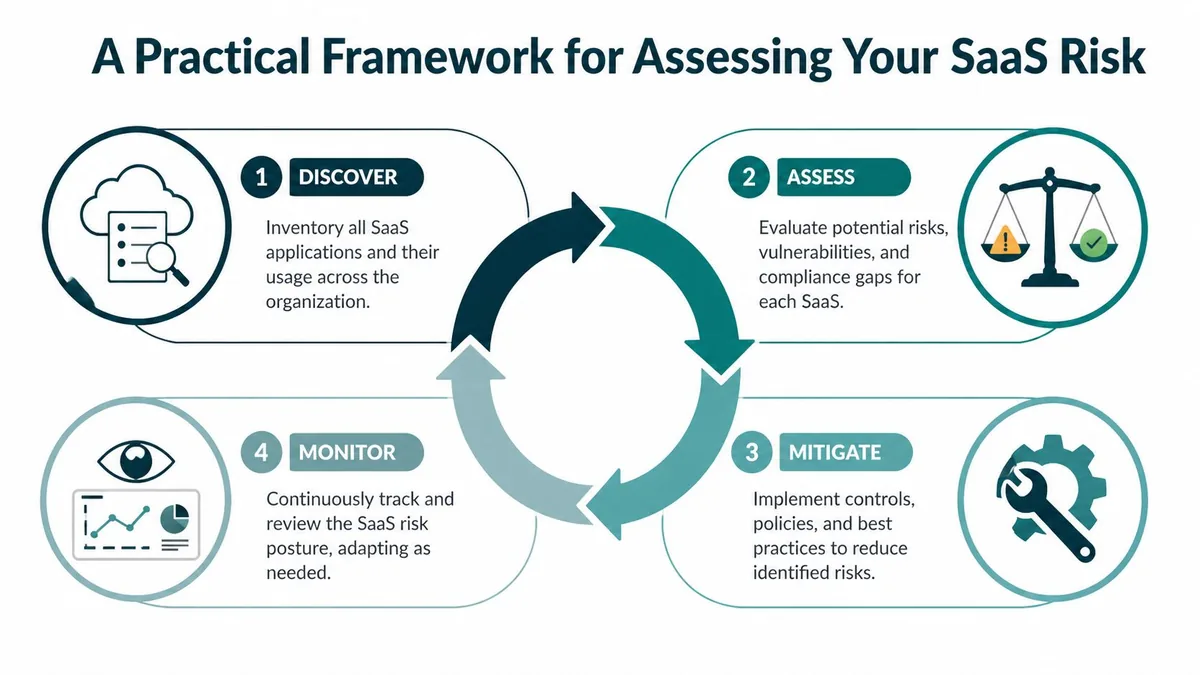
The one that works is four parts. Discover. Assess. Mitigate. Monitor. Then repeat. That rhythm matters because SaaS environments don’t stay still. People move roles, apps get connected, and yesterday’s temporary exception becomes today’s permanent exposure.
The need for a repeatable cycle is clear in broader market data. The BetterCloud 2025 State of SaaS report summary says the average company reduced SaaS applications by 18% from 2022 to 2024, yet nearly 60% of IT professionals still worry about Shadow IT and only 40% have automated offboarding. Cutting apps helps, but it doesn’t fix weak process.
Discover
Start with inventory, not policy.
List your important SaaS tools first. Zendesk, your identity provider, collaboration tools, HR system, file-sharing tools, and any app with customer data or paid seats. Pull from SSO logs, finance records, vendor invoices, and browser or procurement records if you have them.
If your broader environment is messy, this overview of application portfolio management definition gives a useful way to think about app inventory beyond just security.
A good discovery pass should tell you:
- Which apps are active: Not just purchased, in active use.
- Who owns each tool: A person, not a department name.
- What data each app touches: Customer data, internal notes, identity data, exports.
- How users get access: SSO, local auth, manual invites, shared admin setup.
Assess
Once you know what exists, rank the risk. Not every app deserves the same effort.
I like a lightweight scoring approach in a spreadsheet. One column for data sensitivity. One for user count. One for spend. One for integration risk. One for offboarding pain. Zendesk usually ranks high because it combines paid seats, customer data, and third-party app connections.
Working rule: High-cost apps with customer data and broad user access go to the front of the queue.
Mitigate
Mitigation is where teams often stall because they make it too broad.
Don’t try to fix every SaaS problem at once. Take the few applications where the risk is obvious and the cleanup is worth the effort. For Zendesk, that usually means trimming inactive seats, tightening admin access, reviewing marketplace apps, and cleaning up stale tokens.
Monitor
What you clean today will drift again.
Monitoring doesn’t need to be fancy. A monthly review for paid seats, a quarterly access review, and a scheduled app-permission check will catch most of the predictable problems. The goal isn’t perfect surveillance. It’s a cadence that prevents another surprise renewal and reduces the odds of an avoidable incident.
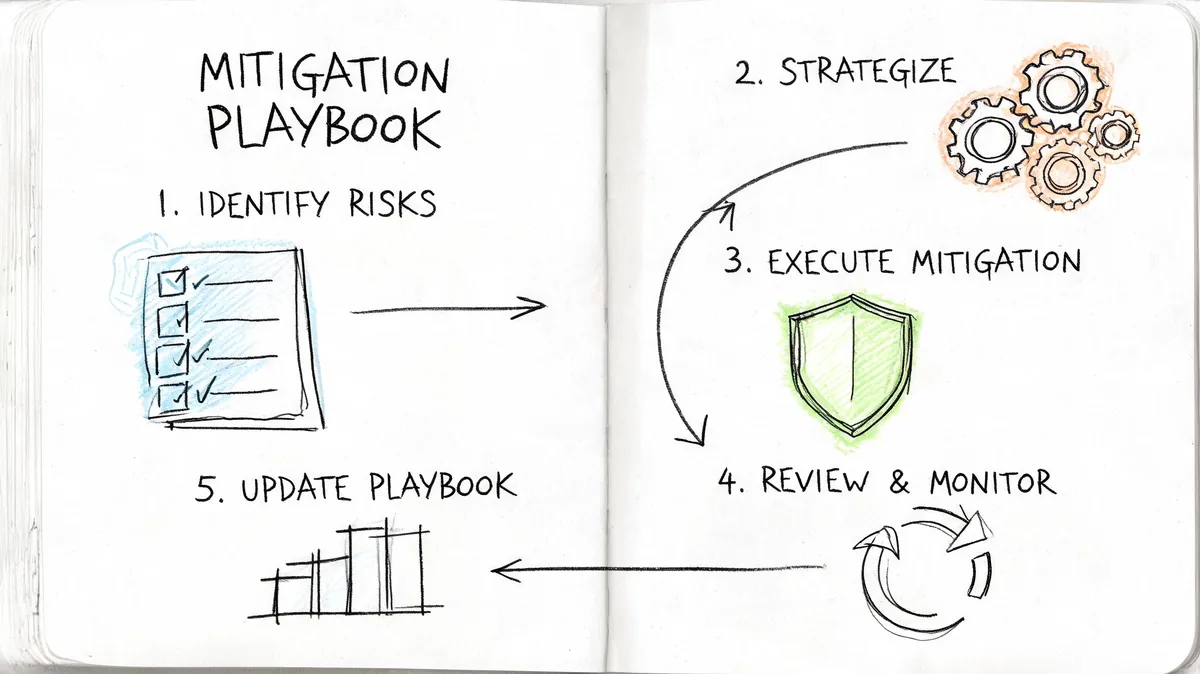
The Mitigation Playbook Concrete Steps to Reduce Risk
Once you’ve identified the problem spots, the fixes are usually familiar. The hard part is doing them consistently.
Start with the controls that cut both exposure and waste. They tend to be the highest-return admin work you can do in Zendesk.
Tighten identity and access
If you do one thing first, do this.
Compromised identities remain one of the clearest paths into SaaS systems, and MFA is one of the most effective controls you can enforce in Zendesk and the identity layer around it. The account itself matters, but the permission level matters just as much. An inactive admin is worse than an inactive light-use agent because the blast radius is bigger.
Use this operating checklist:
- Require MFA: Apply it to every agent account, especially admins and team leads.
- Use SSO consistently: Avoid side-door local accounts unless there’s a documented reason.
- Review roles quarterly: Drop users to agent-level permissions unless admin access is necessary.
- Check exceptions: Temporary administrative access should expire, not linger.
A formal user access review process helps here because it forces one uncomfortable but useful question. Does this person still need this level of access today.
Review third-party apps and tokens
Zendesk Marketplace apps save time, but they’re also one of the easiest ways to expand your risk without noticing.
Each app can bring OAuth scopes, API access, and data movement that live outside the day-to-day awareness of your support team. Some apps are worth it. Some were installed for a short-term need and forgotten. The dangerous ones are the apps nobody can confidently explain.
Look for:
- Unused integrations: If nobody owns it, disable and verify impact.
- Broad permissions: Reduce scopes where possible or replace the app.
- Old API tokens: Rotate or revoke anything tied to departed staff or retired workflows.
- Duplicate tools: If two apps solve the same problem, keep one.
A quick visual walkthrough can help teams align on what to check before they touch production settings.
Marketplace convenience is not the same thing as acceptable access. Review the permission footprint, not just the feature list.
Cut waste before procurement locks it in
Finance usually sees software cost after the technical decisions are already made. That’s backwards for Zendesk.
Before any renewal or seat expansion, review actual activity. Separate active daily agents from occasional users, inactive users, and accounts that should be removed. If someone needs access only for rare cases, a downgrade or process change may be better than a full paid seat.
A practical review looks like this:
| Action | What to check | Why it works |
|---|---|---|
| Remove inactive seats | No meaningful recent usage | Stops direct spend leakage |
| Downgrade over-provisioned users | Role and plan exceed real work | Aligns cost with actual need |
| Tie offboarding to license removal | HR and IT process are connected | Prevents ghost seats |
| Review pre-renewal counts | Compare current use to contracted seats | Gives procurement a real number |
Manual spreadsheet audits can work for small teams, but they break down as environments change. What works better is a recurring usage review with clear inactivity rules and one owner responsible for cleanup.
Put process around new software requests
Most SaaS sprawl doesn’t begin with malicious behavior. It begins with speed.
A manager wants a reporting add-on. A support ops lead tests a QA tool. A contractor connects an integration to solve a temporary workflow problem. Nobody means to create governance issues. They just need to get work done. Without a lightweight approval path, you end up with scattered apps, duplicate spend, and unclear data flows.
Set a request standard that asks for four things:
- Business owner: Who’s accountable after setup.
- Data access: What customer or internal data the app will touch.
- License impact: Whether it adds paid seats or overlaps with an existing tool.
- Exit plan: How access will be removed if the trial or project ends.
That small amount of friction saves a lot of cleanup later.
Your Implementation Roadmap Before the Next Renewal
Teams often wait too long. They start reviewing Zendesk when procurement asks for approval or when the vendor quote arrives.
By then, you’re negotiating from bad data. You’re trying to work out what you need while the clock is already running. A better move is to treat the renewal date as the end of the process, not the start.
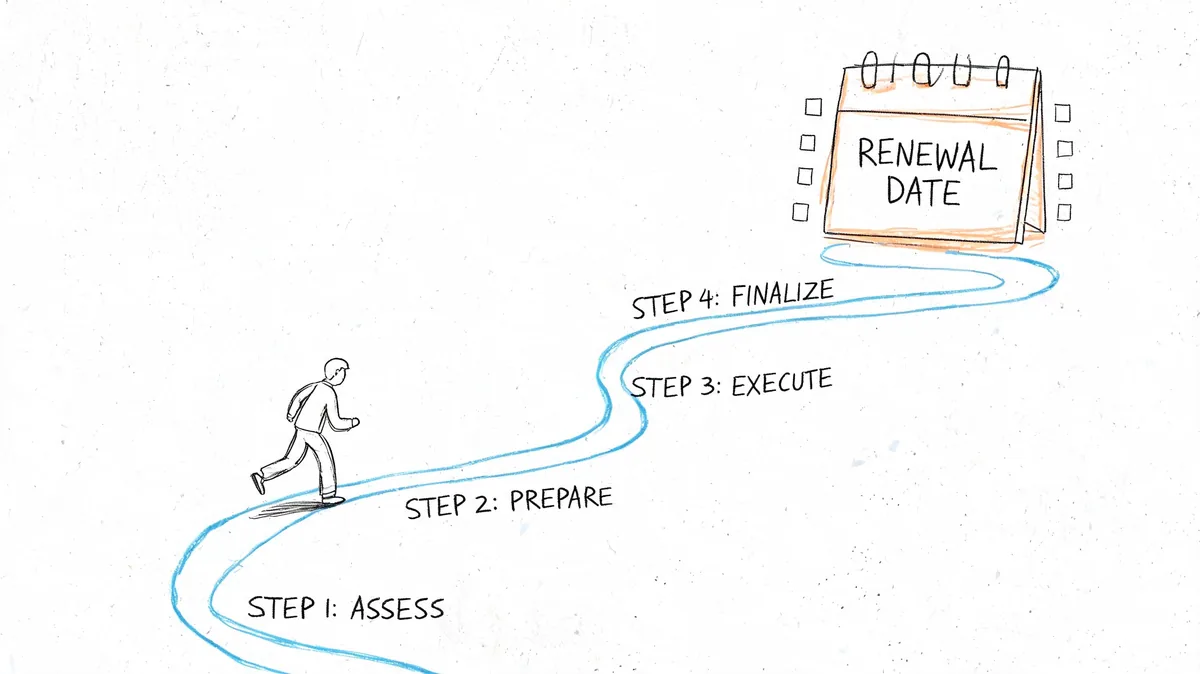
Thirty days out
Start with a real usage and access audit.
Pull your active agents, admin list, groups, and app inventory. Review who signed in, who worked tickets, and which accounts exist only because nobody removed them. Then review marketplace apps and integrations. As Zluri’s guidance on SaaS risk management notes, uncontrolled app-to-app integrations are a growing risk vector, and risky OAuth scopes or unmonitored API tokens can turn one weak point into a broader breach path.
Use this checklist:
- Review agent activity: Separate active, occasional, and inactive users.
- Check admins: Remove privileged access that no longer has a reason.
- Audit app permissions: Focus on connected apps that touch ticket or user data.
- List renewal decisions: Keep, remove, downgrade, or investigate.
Two weeks out
Now make the changes that reduce both spend and exposure.
Remove inactive agents where you’ve confirmed no business need. Reduce role levels where admin rights are no longer justified. Retire old tokens and disable integrations with no clear owner. If a team insists an account or app must stay, ask for a current business reason and a review date.
That one step changes the renewal conversation. You move from “why is this so expensive” to “here’s the exact count we still need and why.”
One week out
Prepare the business case for finance or procurement.
Don’t send a vague note saying you cleaned things up. Send the numbers from your own environment. Show the current paid seat count, the seats removed, the users downgraded, and any app subscriptions you’ll keep because they support a real workflow. Pair that with a short note on risk reduction, especially around admin access and unneeded integrations.
A few KPIs are enough:
| KPI | Why track it |
|---|---|
| Licenses reclaimed | Shows direct cost reduction |
| Users downgraded | Shows better alignment of access and spend |
| Active admin accounts | Shows reduced blast radius |
| Integrations reviewed | Shows app governance is happening |
| Offboarding completion status | Shows whether ghost access will return |
The teams that save money on renewal usually did the cleanup weeks earlier, not the night before approval.
What success actually looks like
You don’t need a dramatic transformation. You need fewer paid seats nobody uses, fewer people with broad access, and fewer apps nobody remembers installing.
For one mid-market Zendesk team, success might look like this in practice. They run a pre-renewal audit, find a cluster of inactive agents, confirm several old project accounts can go, and reduce the renewal count before procurement signs. They also trim admin access and remove a stale integration that no longer serves a live workflow. Nothing flashy. Just tighter control, lower waste, and less exposure.
That’s the outcome worth aiming for. Not a perfect environment. A governed one.
If your Zendesk renewal is coming up and you want a faster way to find idle seats, LicenseTrim connects to Zendesk with read-only access, flags inactive agents, and shows the wasted spend tied to unused licenses. It’s a practical way to replace spreadsheet audits with a clear report before you commit to another year of seats.