Meta description: User provisioning software fixes onboarding and offboarding gaps, but it won't catch idle Zendesk seats. Learn where it helps and where waste remains.
A new support hire starts at 9:00. By 10:30, they still can't get into Zendesk. Someone filed the access ticket, but the approval sat in a queue, the right group wasn't assigned, and IT is now chasing three different admins to get one person working.
A week later, you see the other side of the same problem. An employee left. Their laptop is gone, payroll is updated, but their app access is still active because nobody closed the loop. That is a security problem, an audit problem, and usually a sign that too much of your access process still depends on memory and inboxes.
That's where user provisioning software comes in. It fixes the joiner, mover, leaver process that breaks when teams rely on tickets, spreadsheets, and manual admin work. If you're dealing with recurring setup delays, role-change mess, or stale accounts, it's worth understanding what provisioning software does well, and what it doesn't.
The Onboarding and Offboarding Headache You Know Too Well
Most teams don't notice access management when it works. They notice it when a rep can't answer tickets on day one, or when a former employee still shows up in your admin screens long after they left.
The usual pattern is familiar. HR enters the new hire. A manager sends a Slack message. IT opens a ticket. Someone assigns a Zendesk seat, someone else adds Google Workspace access, and a third person forgets the VPN group. Your new agent spends the morning waiting instead of training.
Offboarding fails in a different way. Nothing looks urgent because the employee is already gone. Then an admin realizes their accounts were never disabled across every system. Manual offboarding tends to break at the edges, especially when access lives in several SaaS tools and on-prem systems.
If your team is trying to clean this up, automated employee onboarding is usually the first place to look. It tackles the repetitive setup work that creates delays and inconsistent access.
Manual access work rarely fails in one dramatic moment. It fails in small gaps, and those gaps pile up into downtime, risk, and rework.
Finance leaders usually care about the same thing IT cares about here. Lost time, excess access, and avoidable spend. Provisioning software exists because those costs keep showing up in ordinary operations.
What Is User Provisioning Software?
User provisioning software is the system that creates, changes, and removes user accounts across your business apps. Think of it as the access layer that connects your employee records to the systems people use.
According to IBM's overview of user provisioning, provisioning software is a lifecycle-automation system that creates, modifies, and deletes accounts across multiple IT systems. The point is to reduce the manual work and security risk that come with traditional onboarding and offboarding.

It follows the employee lifecycle
A basic lifecycle model is utilized by many teams:
- Joiner: Create accounts and assign baseline access
- Mover: Update access when someone changes role or department
- Leaver: Remove access quickly when employment ends
That sounds clean on paper. In practice, the hard part is consistency. If a support lead moves into ops, you don't just add tools. You also need to remove old permissions they no longer need.
It replaces ticket chains with rules
Good provisioning setups are policy-driven. HR or your identity provider becomes the source of truth for user attributes like department, location, manager, or job title. Those attributes trigger access rules.
A support agent might get Zendesk, Slack, and your knowledge base by default. A finance analyst gets a different stack. A contractor gets time-bound access and tighter approvals.
If you're helping HR think through the front half of that process, this HR leader's guide to onboarding is useful because it frames onboarding as an operational system, not just an HR checklist.
Practical rule: If your access process starts with "someone remembers to submit a ticket," you don't have a process. You have a dependency.
How Provisioning Works Key Concepts and Workflows
Most provisioning discussions get messy because several related systems overlap. The cleanest way to understand it is to separate the action, the policy, and the connection standard.
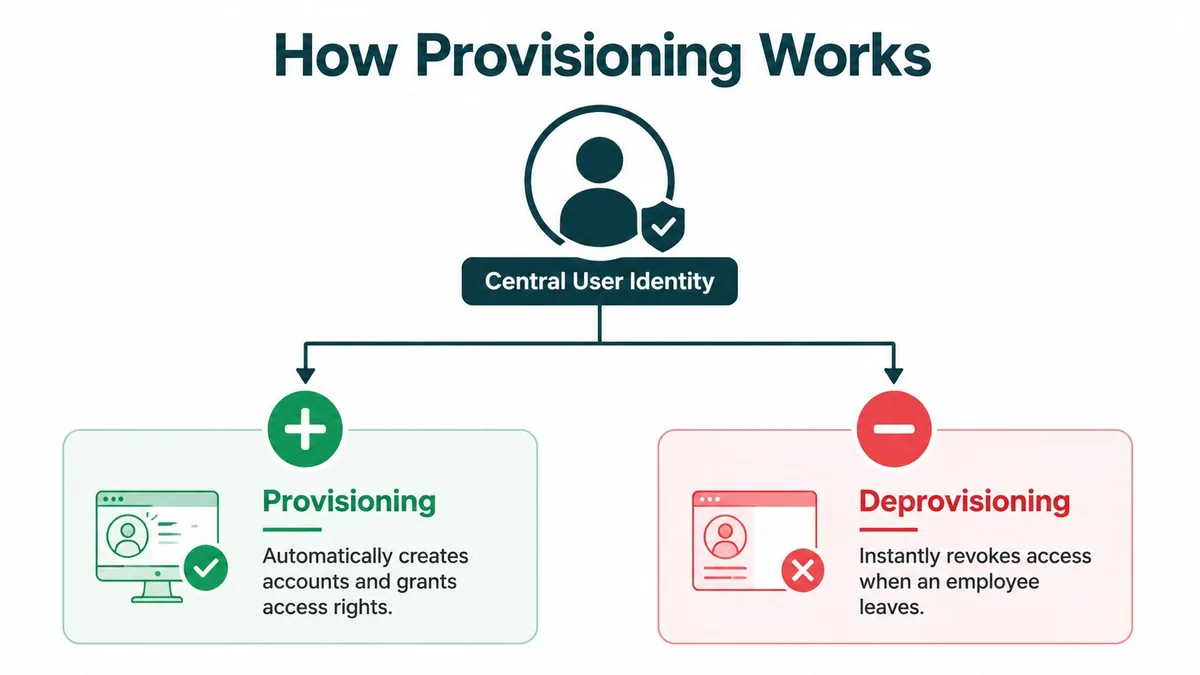
Core provisioning concepts
| Term | What It Does |
|---|---|
| Provisioning | Creates accounts and grants initial access |
| Deprovisioning | Removes or disables access when it is no longer needed |
| RBAC | Assigns access based on role rather than one-off manual decisions |
| SCIM | Standardizes how systems create, update, and deactivate user accounts |
| SSO | Lets users sign in once to access multiple apps |
What each part actually handles
Provisioning is the setup event. A person joins, and the system creates the right accounts.
Deprovisioning is the teardown event. A person leaves, and access should be removed immediately, not after someone gets around to it.
RBAC, or role-based access control, is how you avoid custom permission sprawl. Instead of hand-building access per user, you define what a support agent, team lead, or admin should get.
SCIM is one of the technical pieces that makes this automation work across SaaS apps. As noted in SIIT's write-up on automated provisioning tools, SCIM 2.0 and modern APIs are core enablers of automated provisioning because they let systems reliably create, update, and deactivate accounts across cloud applications.
SSO is related, but separate. It handles authentication. Provisioning handles account lifecycle and permissions.
A basic workflow in the real world
A common flow looks like this:
- HR creates or updates the employee record.
- Your identity platform reads department, title, location, or manager.
- Rules assign the right apps and permission level.
- SCIM or APIs push those changes into downstream tools.
- If the person changes role, access updates.
- If they leave, accounts are disabled or removed.
That model is why data quality matters so much. If the title in HR is wrong, the access can be wrong too.
For teams working through adjacent identity tasks, the DataLunix Freshservice Active Directory guide is a practical example of how user sync and SSO fit together in actual operations.
Where teams get tripped up
The biggest confusion is expecting one tool to do everything. It won't.
- SSO isn't provisioning: A user may be able to sign in, but still lack the right role.
- Provisioning isn't governance: Account creation doesn't prove access is appropriate over time.
- Automation isn't accuracy: Bad source data creates bad outcomes faster.
If you want a deeper view on the governance side, Okta identity governance is worth understanding alongside provisioning. Provisioning gets people into systems. Governance checks whether they should still be there, and with what level of access.
Provisioning is about speed and consistency. Governance is about control after the initial access grant.
The Business Case for Automated Provisioning
Provisioning software isn't just an IT cleanup project. It's part security control, part operations control, part audit control.

The category itself has grown fast. Allied Market Research estimated the global user provisioning market at $4.3 billion in 2021 and projected $15.0 billion by 2031, a 13.6% CAGR. That's a projection, not a guarantee, but it tracks what many teams already feel on the ground. Manual lifecycle admin doesn't scale.
Security gets cleaner
A strong provisioning setup cuts the time between an HR event and an access change. That matters most during offboarding and role changes.
You want fewer orphaned accounts, fewer standing permissions, and less reliance on someone remembering a checklist. Automated deprovisioning is one of the clearest wins because manual delays create obvious risk.
Ops gets less noisy
Provisioning also reduces the background admin work that clogs IT and support operations. Fewer access tickets. Fewer one-off changes. Less back-and-forth between HR, managers, and system owners.
If you're thinking about automation more broadly, this article on how teams achieve scalable growth via automation gives a useful business lens, especially for ops and finance readers.
A short explainer helps here:
Compliance gets easier to prove
Auditors don't want a verbal summary of how access is supposed to work. They want records. Who got access, when, why, and who approved it.
Provisioning systems can help by creating a consistent trail of access changes. That doesn't replace reviews or broader identity governance, but it gives you cleaner evidence than email chains and screenshots.
If your audit prep still involves asking three admins to search their inboxes, your access process is too manual.
Common Implementation Patterns and Pitfalls
The pattern that works best for most mid-market teams is boring on purpose. Pick one source of truth for people data, keep role logic as clean as possible, and automate from there.
Start with a trusted source
For many teams, that source is the HR system. Workday, BambooHR, HiBob, or another HRIS holds the official employee status, manager, department, and job title. Provisioning tools then use that data to trigger downstream access.
That model matters because somebody has to own identity changes. If HR updates a termination date, your access systems should react. If a department changes, role access should update from the same record.
What usually goes wrong
Most failed projects don't fail because SCIM is hard. They fail because the company automates a messy process without cleaning it up first.
Common mistakes include:
- Dirty user data: Job titles, departments, and managers aren't reliable enough to drive rules
- Role sprawl: Every exception becomes a new role, and soon nobody understands access logic
- Manual work in disguise: Teams buy automation but keep approval steps that still depend on email
- No exception plan: Contractors, temporary coverage, shared inboxes, and acquisitions don't fit the default model
- Too much app ambition: Teams try to automate every system at once instead of starting with high-impact apps
Why mid-market teams are doing this now
This isn't just an enterprise project anymore. KBV Research, cited by Market Research Future, notes that small and medium-sized enterprises accounted for 37% of user provisioning market revenue in 2024. That lines up with what you see in practice. Once a company has enough SaaS apps and enough employee movement, manual provisioning starts costing too much in admin time and risk.
A practical rollout order
A cleaner rollout usually looks like this:
- First, map reality: List your joiner, mover, leaver steps as they happen today, not as policy says they happen.
- Then clean inputs: Fix titles, departments, reporting lines, and inactive accounts before automating anything.
- Next, define a few real roles: Support agent, support lead, finance analyst, contractor. Start small.
- After that, connect priority apps: Zendesk, Google Workspace, Slack, your IdP, and any app tied to security or revenue.
- Last, document exception handling: Temporary access, shared ownership, and approval overrides need rules too.
Bad provisioning logic scales bad decisions faster. Clean data and restrained role design matter more than feature count.
The Hidden Cost That Provisioning Tools Miss
Provisioning tools answer one question well. Does this person have access?
They usually don't answer the next one. Is that access being used, and is the license level still appropriate?

That gap shows up all the time in Zendesk. You provision a manager into Support with an agent seat because they might need access. Months later, they only log in to check dashboards or review one queue. The provisioning flow worked. The license decision may still be wrong.
Zendesk pricing makes that expensive fast. On annual billing, Suite Team is $55, Growth is $89, Professional is $115, and Enterprise is $169+ per agent per month. If someone is sitting on a Professional seat and rarely uses it, your provisioning system won't flag that by itself.
Oloid's discussion of provisioning and deprovisioning points to the same blind spot. Standard user provisioning software focuses on onboarding and offboarding, but often lacks tools for ongoing license governance or idle-seat detection. That's why unused SaaS access can sit around long after the lifecycle workflow is technically complete.
For Zendesk teams, a separate license monitoring layer helps here. User provisioning automation handles access workflows. A tool like LicenseTrim handles ongoing seat review by connecting to Zendesk, checking actual usage, and showing which agent licenses look inactive or underused so admins can decide whether to remove or downgrade them.
Provisioning prevents access chaos. It doesn't prevent license drift.
What to Do Before Your Next Zendesk Renewal
Start with a process audit. Look at how users get Zendesk access today, how role changes are handled, and how offboarding really works. Don't trust the written policy until you've compared it to actual admin behavior.
Then quantify two separate costs. One is operational drag from manual provisioning work. The other is wasted spend from licenses that stay assigned after the need has changed. Those are different problems, and they need different controls.
Finally, evaluate tools by job. Use provisioning software for lifecycle automation, role assignment, and deprovisioning. Use a license governance tool when you need visibility into whether paid seats are still active and right-sized.
If Zendesk is a meaningful line item for your team, LicenseTrim is a practical way to get that second set of data before renewal. It connects to Zendesk, checks inactive or underused agent seats, and shows the wasted spend without changing anything automatically.
Before you renew, get the numbers first. LicenseTrim gives Zendesk admins and finance teams a read-only audit of inactive agent licenses and wasted seat spend, so you can decide what to remove or downgrade with real usage data.