Meta description: Zendesk renewals often get treated like routine buying. Learn procurement vs acquisition, spot wasted seats, and cut recurring SaaS spend.
Your Zendesk renewal lands in your inbox. Finance sees a vendor bill that needs approval. You see old agent accounts, role changes, seasonal hires, and a seat count nobody has challenged in months.
That gap is where SaaS waste starts.
Organizations often treat Zendesk like office supplies. Count heads, renew seats, move on. That’s fine if every paid agent is active and every role still needs full access. In real accounts, that rarely holds up. Support reps leave. Team leads stop working tickets. Contractors roll off. Someone keeps a paid seat because nobody wants to break workflows right before renewal.
That’s why procurement vs acquisition matters more than it sounds. For everyday software management, procurement is the act of buying the subscription. Acquisition is the decision to secure the capability your team needs. If you skip the second part, the first part turns into a rubber stamp.
That Zendesk Renewal Is Due Again
You know the pattern. Renewal notice. Updated quote. Internal thread starts. Someone from finance asks if procurement can push for a better price. Meanwhile, your admin view tells a different story.
A few agents were added for a busy period and never removed. A manager who only checks reports still has a full paid seat. Another user moved out of support but still sits in Zendesk because nobody wanted to touch permissions during a reorg. The invoice is clean. The account isn’t.
What finance sees and what you see
Procurement teams often look at a renewal as a purchasing task. Vendor, contract term, seat count, approval. That’s their job.
You’re looking at behavior. Who logged in. Who solved tickets. Who hasn’t touched the platform in months. That’s a different layer of truth, and it changes what you should buy.
Renewing the same seat count without checking usage isn’t cost control. It’s just repeating last year’s mistake.
Zendesk is a core operating system for support teams, not a one-time asset purchase. But it also isn’t a commodity item you should renew blindly. Seat decisions sit in the middle. They affect budget every month and team capability every day.
Why this turns into waste fast
A renewal usually happens under time pressure. Nobody wants disruption. So the safest path feels like keeping the current count and sorting it out later.
Later rarely comes.
What works is treating renewal prep as an operating review, not an invoice exercise:
- Check actual use: Look at agent activity, not just assigned seats.
- Review role fit: Full agent access often sticks long after job responsibilities change.
- Audit exceptions: Temporary users tend to become permanent billing entries.
- Bring finance evidence: Usage data gets attention faster than opinions.
Procurement vs Acquisition The Core Differences
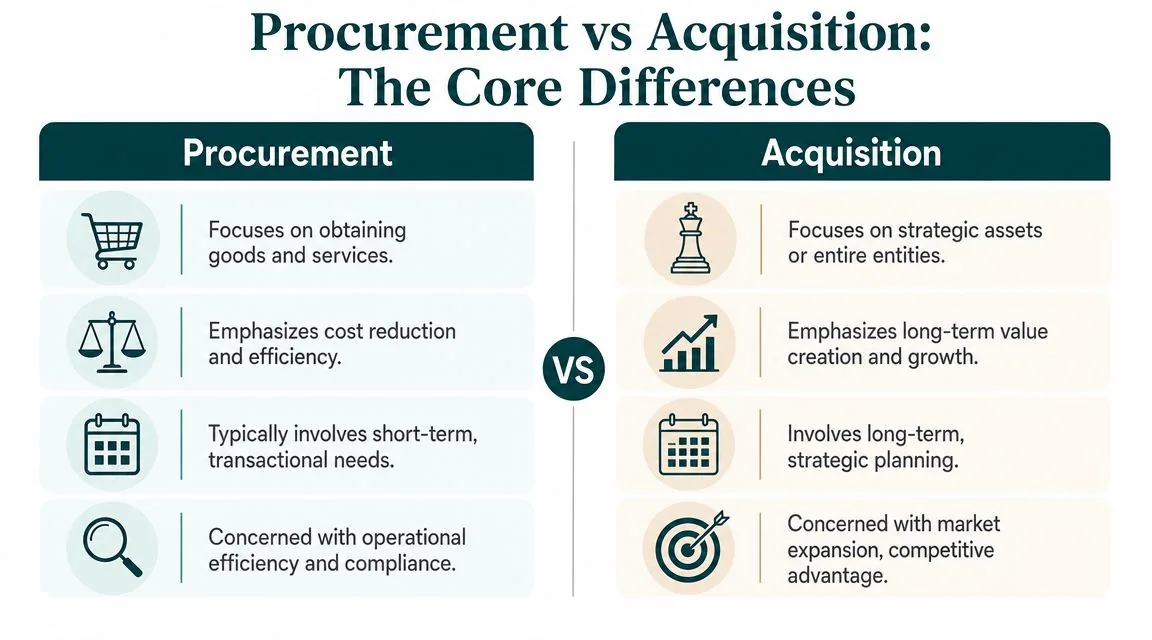
At a high level, procurement is about buying what the business needs to run. Acquisition is about obtaining something bigger and more strategic, whether that’s a major asset, a capability, or in many business contexts, another company.
According to GEP’s explanation of procurement and acquisition differences, procurement focuses on optimizing operational budgets through competitive bidding, volume discounts, and strategic sourcing, while acquisitions are major capital investments that need specialized expertise.
Here’s the quick view.
| Criterion | Procurement (The "How") | Acquisition (The "What") |
|---|---|---|
| Primary goal | Control cost and keep operations running | Gain strategic capability or long-term advantage |
| Budget type | Operating budget | Capital-heavy or strategic investment |
| Workflow | Repeatable, policy-driven, ongoing | One-off, complex, high-stakes |
| Main concern | Price, compliance, supplier performance | Value, fit, risk, integration |
| Typical documents | RFPs, contracts, purchase orders, renewals | Due diligence materials, legal agreements, integration plans |
| Decision owners | Procurement, finance, department leads | Executive team, legal, finance, board-level stakeholders |
| In SaaS terms | Renewing and negotiating subscriptions | Deciding which capabilities the business should actually hold |
The difference that matters in daily operations
Procurement is process-heavy by design. You need consistency. You need controls. You need a way to manage suppliers and paperwork without rethinking every purchase from scratch.
Acquisition is different. It asks whether the business should own or commit to something in the first place because the stakes are larger and the decision is harder to reverse.
That distinction gets blurry with SaaS. You aren’t buying a company, but you are buying recurring access to business capability. That’s why many teams confuse the terms when software renewals come up.
If you want a tighter breakdown between procurement and day-to-day buying, LicenseTrim has a useful explainer on the difference between procurement and purchasing. It helps separate routine transactions from broader decision-making.
Why the wording changes the outcome
Call Zendesk renewal “just procurement” and the work becomes price negotiation plus approval routing.
Treat it as a capability decision and different questions show up:
- Do all assigned users still need paid access
- Are you paying for the right plan mix
- Should some seats be removed or downgraded
- Has the support org changed since the last term
That’s where savings usually come from. Not from squeezing the vendor a bit harder, but from buying the right amount in the first place.
How They Diverge in Practice
The practical difference shows up in who gets involved, what gets measured, and what kind of mistakes hurt you.
According to Ramp’s breakdown of procurement vs acquisition, acquisition is a distinct process from procurement, with higher complexity, higher financial stakes, and multi-step due diligence led by executive leadership, investment bankers, and legal advisors.
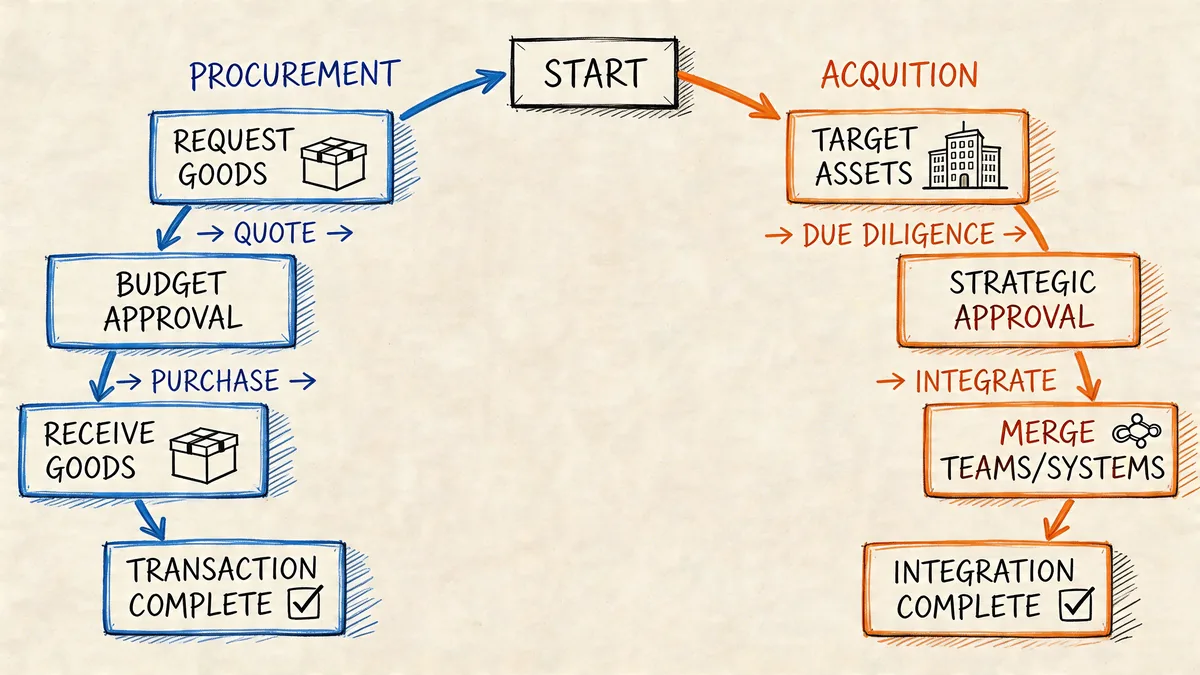
Procurement runs on repeatability
For software, procurement usually follows a familiar path. Request comes in. Budget gets checked. Vendor terms are reviewed. Legal may look at renewal language. Finance approves. Seat count gets carried over unless somebody objects.
Success in that model is operational:
- Cycle time: How fast the request moves
- Cost control: Whether spend stays in budget
- Vendor management: Contract terms, billing accuracy, renewals
- Compliance: Following internal approval rules
That works well for laptops, standard software, and routine vendor spend. It breaks down when the seat count itself is wrong.
Acquisition absorbs uncertainty
Acquisition work is built around unknowns. Financial exposure is larger. Risk is broader. Integration can fail even after the deal closes.
The success metrics are different too:
| Area | Procurement view | Acquisition view |
|---|---|---|
| Main KPI | Cost to buy and operate the process | Return from the asset or deal over time |
| Risk type | Delivery issues, pricing changes, supplier performance | Legal, financial, integration, organizational fit |
| Timeline | Near-term and recurring | Long-term and milestone-based |
| Stakeholders | Buyers, finance, ops managers | Executive team, legal, strategic leadership |
Practical rule: If the biggest question is “how do we buy this well,” you’re in procurement. If the biggest question is “should we hold this capability at all,” you’re moving into acquisition thinking.
Where SaaS teams get stuck
Zendesk admins and IT managers sit in the overlap. The workflow around renewal is procurement. The seat decision underneath it is closer to acquisition logic.
That’s why bad outcomes are common even when the purchasing process is well run. You can have approved vendors, clean contracts, and on-time renewals, then still overpay because your user base shifted and nobody validated actual use.
What works better is splitting the problem in two:
- Govern the capability first. Decide who needs paid access.
- Buy second. Take that validated number into renewal.
The process is often executed in the opposite order. That’s how waste survives.
The Gray Area SaaS License Governance
SaaS renewals don’t fit neatly into one bucket. You do procure subscriptions. But you’re also deciding which people in your company should continue to hold a paid capability.
That’s why Zendesk license governance sits in a gray area between purchasing and strategic allocation.
According to Procurement Tactics on the procurement vs acquisition distinction, a key unanswered question is whether renewing underutilized Zendesk licenses counts as procurement or acquisition. The same source says 32% of enterprises overspend by over $1M annually on idle SaaS seats, and the distinction matters because procurement teams often lack usage data.
A renewal is really a set of user-level decisions
From the vendor side, renewal is one line item. From your side, it’s a collection of seat-level judgments:
- Still needed: The agent is active and should keep access.
- Changed role: The user may need lighter access or none at all.
- Inactive: The seat should be removed before renewal.
- Temporary: The seat should never have rolled into an annual commit.
That isn’t classic procurement work. It’s closer to deciding which capabilities your team should keep funding.
A related point shows up in this guide to indirect procurement. SaaS often looks like an indirect operating expense, but the governance burden is higher because the spend keeps renewing whether usage does or not.
Why normal approval flows miss the problem
Most approval chains ask the wrong people the wrong question.
Manager attestation sounds good in theory. In practice, it produces fast replies like “yes, keep them all” because no one wants to be responsible for removing access and causing disruption. Finance sees a known tool with known business value and signs off.
Nobody is lying. They just aren’t looking at system behavior.
If your renewal decision depends on memory, org charts, and Slack replies, you don’t have license governance. You have seat inheritance.
That’s a critical issue in procurement vs acquisition for SaaS. Procurement is good at buying from vendors. It isn’t built to judge whether each assigned user still warrants recurring spend. You need usage evidence for that.
Quantifying the Waste in Your Zendesk Account
The debate ceases to be purely academic. A few bad seat decisions can turn into real annual waste.
Zendesk annual pricing matters here because even small seat counts add up fast. If you’re on annual billing, the rates are Suite Team $55, Growth $89, Professional $115, Enterprise $169+ per agent/month.
Three common waste patterns
Here’s what this looks like in a mid-market Zendesk account using Suite Professional at $115 per agent/month.
| Scenario | Seat count | Annual waste calculation | Annual waste |
|---|---|---|---|
| Seasonal agents left after peak | 5 | 5 × $115 × 12 | $6,900 |
| Team leads kept on full agent seats | 3 | 3 × $115 × 12 | $4,140 |
| Users moved departments but kept access | 4 | 4 × $115 × 12 | $5,520 |
Combined, that’s $16,560 per year from 12 seats that many teams would miss in a routine renewal review.
That’s not an edge case. It’s ordinary account drift.
Why spreadsheets miss it
You can audit this manually. Plenty of teams do. Export users. Check last login. Ask managers. Reconcile against HR lists. Then try to finish before renewal paperwork closes.
The process is slow and easy to abandon halfway through. A calculator can at least help you frame the exposure quickly. If you want a neutral way to model recurring software spend, WhatPulse has a practical software license cost calculator that’s useful for rough renewal scenarios.
For ongoing governance, the more useful benchmark is total cost to procure, not just subscription price. According to Ivalua on procurement benchmarking, procurement benchmarking looks at total cost to procure, while acquisition evaluates higher-stakes risks. The same source says continuous monitoring can find 30-40% savings from usage analysis for SaaS.
What actually helps
The teams that get control of Zendesk spend usually do three things well:
- Audit before negotiation: Seat cleanup comes before vendor conversations.
- Use activity data: Last login and real usage beat manager memory.
- Separate access types: Not every user needs the same paid seat.
You don’t need a huge governance program. You need accurate visibility before the renewal number hardens.
Using Tools to Bridge the Procurement-Acquisition Gap
Manual review breaks once your account has enough churn. New hires, contractors, backfills, cross-functional users, old admins, and inherited permissions start piling up. By the time renewal arrives, nobody fully trusts the seat count.
That’s where tools help. Not because they replace judgment, but because they give you evidence.
Visibility changes the conversation
A usage-based tool can pull actual Zendesk activity, flag inactive or underused users, and turn a vague “I think we have waste” into a concrete recommendation list.
That matters because the procurement side needs a clean number to buy against, while the acquisition side needs proof that a given user should or shouldn’t keep funded access.
The same pattern gets worse after company changes. According to Precoro’s discussion of procurement vs acquisition overlap, 30-50% of procurement synergy savings can go unrealized after deals because of overlooked SaaS sprawl and unoptimized licenses in the acquired stack. Even if you’re not doing M&A, the lesson holds. Whenever teams, roles, and systems shift, unused software seats stick around.
What to look for in a SaaS management tool
You don’t need broad platform theater for this problem. You need a tool that answers a few practical questions well:
- Who is inactive: Not just assigned, but inactive in practice
- What it costs: Seat-level wasted spend in dollars
- How current it is: Ongoing visibility beats one-time exports
- Whether admins stay in control: Recommendations should not make changes behind your back
If you’re comparing options, this overview of SaaS spend management tools is a decent place to start. The useful distinction is whether a tool only tracks contracts or whether it also reads product usage.
Good procurement needs good inputs. If the seat count is wrong, the renewal will be wrong too.
What to Do Before Your Next Zendesk Renewal
Don’t wait for the quote to show up before looking at your account. By then, the internal pressure is to approve, not to investigate.
Start earlier and make the review repeatable.
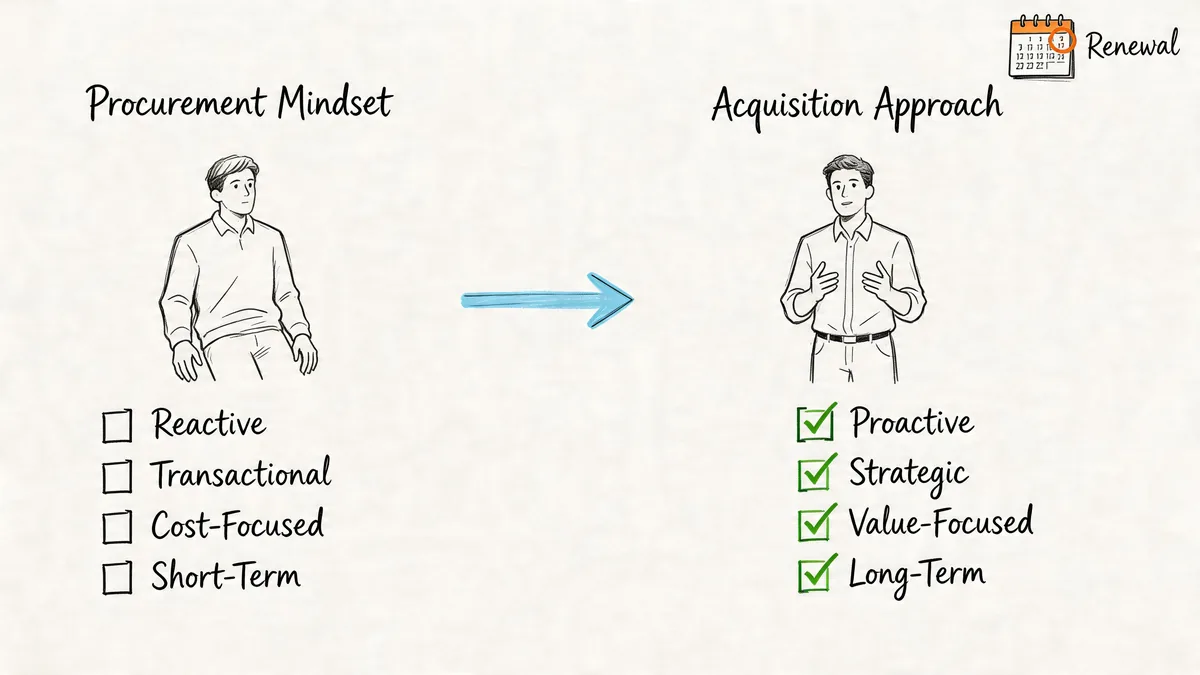
A practical renewal checklist
- Set a 60-day reminder: Start the audit before the vendor pushes paperwork.
- Pull a current user list: Include paid agents, admins, and any edge-case accounts.
- Check recent activity: Focus on actual use, not ownership assumptions.
- Review role drift: Team leads, analysts, and former support staff often keep paid seats too long.
- Mark action types: Remove, downgrade, keep, or review manually.
- Take the revised number to procurement: Negotiate from the cleaned seat count, not the inherited one.
How to present it internally
Finance and procurement teams respond well to a short, clean summary. Keep it tight.
| What to show | Why it matters |
|---|---|
| Current paid seat count | Establishes baseline spend |
| Inactive or questionable users | Shows where waste likely sits |
| Recommended removals or downgrades | Turns review into action |
| Annual dollar impact | Gives procurement a usable target |
If you need broader habits for recurring software control, Senki has a practical piece on how to manage subscriptions and stop wasting money. It’s useful because it treats subscription oversight as an operating discipline, not a once-a-year cleanup job.
The shift that saves money
The best change is mental. Stop treating Zendesk renewal as a vendor task only. Treat it as a governance decision backed by usage data.
Once you do that, procurement vs acquisition stops being abstract terminology. It becomes a better way to decide how many licenses you should pay for.
If you want a faster way to audit Zendesk seats before renewal, LicenseTrim connects to Zendesk with read-only access, flags inactive agents, and shows the wasted spend tied to unused licenses. It’s a practical way to walk into procurement with numbers instead of guesses.