Meta description: Zendesk costs keep climbing when inactive agents stay licensed. Learn how application management systems cut waste and improve control.
Your Zendesk invoice lands. The agent count looks familiar, but the usage doesn’t.
You know the pattern. A few people changed roles. One left the company. Another only logs in when a queue spikes. A manager wanted spare seats kept open “just in case.” Now Finance wants an answer for why you’re still paying for all of them.
That’s where application management systems matter. Not as enterprise jargon, and not as another platform to buy. As a disciplined way to control who gets access, who still needs it, and where software spend is drifting without anyone noticing.
That Sinking Feeling When the Zendesk Bill Arrives
The problem usually shows up in billing before it shows up in operations.
You renew Zendesk for the same seat count because proving otherwise takes work. Someone has to pull users, compare roles, check activity, chase managers, and make sure removing a license won’t break coverage. So the count stays where it is. Waste becomes the safer option.
For mid-market teams, that’s normal. It’s also expensive.
A lot of the frustration comes from visibility. Zendesk can tell you who exists in the account. Your HR system knows who left. Your SSO tool knows who can sign in. None of that automatically answers the budget question: who still needs a paid agent seat right now.
You rarely overpay for Zendesk because of one bad decision. You overpay because nobody owns the cleanup end to end.
Manual checks make it worse. Spreadsheets go stale. Admins export lists that are outdated a week later. Team leads approve access quickly, but nobody revisits it after the busy season or org change.
That’s one reason the broader market has grown so fast. The global application management services market was valued at USD 34.40 billion in 2023 and is projected to reach USD 121.75 billion by 2030, according to Grand View Research’s application management services market analysis. The reason is practical, not abstract. Small and mid-sized companies need better control over growing software portfolios.
Zendesk is a clean example because the waste is easy to feel. You pay per agent. If an inactive person keeps a paid seat, the bill keeps running whether they answer tickets or not.
What Are Application Management Systems Anyway
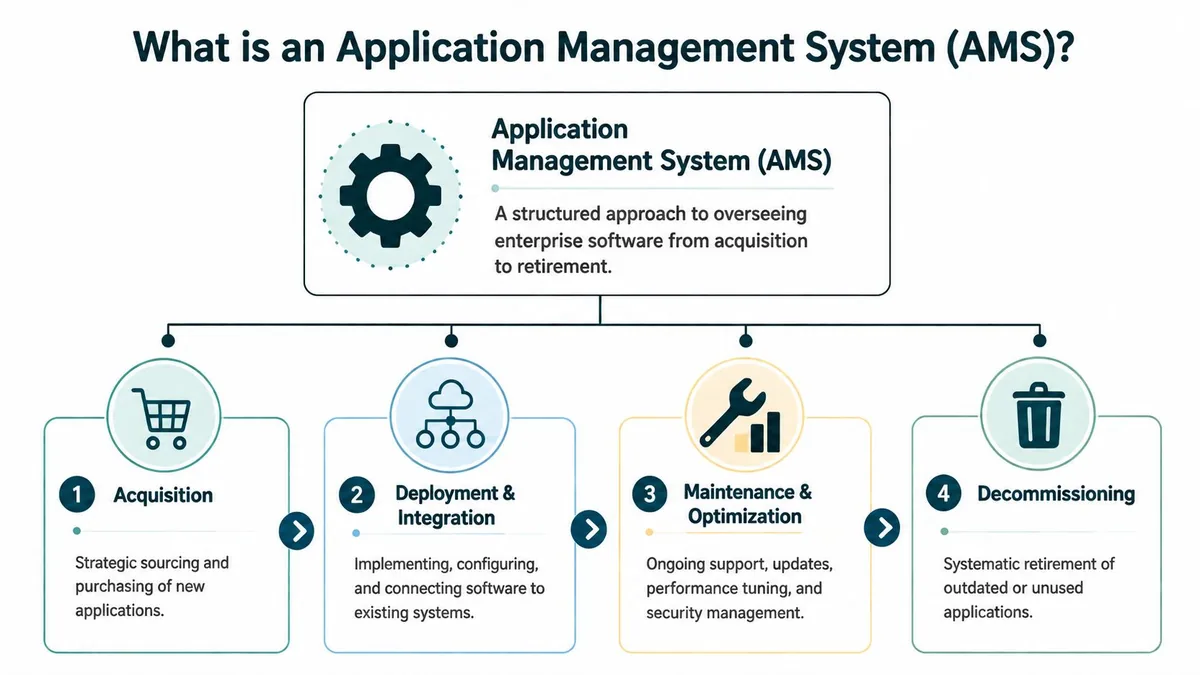
An application management system is the operating model behind your software estate. It covers how your team buys, assigns, reviews, supports, and retires business apps.
For a finance lead, the useful definition is even shorter. It’s the set of rules and workflows that stop software costs from drifting.
Support and maintenance
Start with the obvious part. Zendesk has to keep working.
That includes user issues, app integrations, workflow changes, and the day-to-day admin work that keeps support running. If views break, macros are outdated, or an integration fails after a config change, your support team feels it immediately.
Good support practice isn’t glamorous. It’s documented ownership, change control, and a clear path for fixing problems before they stack up.
Security and access control
Next is who can do what.
In Zendesk, there’s a real difference between a full admin, a manager, and a standard agent. Too much access raises risk. Too little access slows work down. Application management systems put guardrails around role assignment, approval, and review.
A finance team should care about this because bad access control creates two costs. The first is risk. The second is seat inflation, where people end up with broader, paid access because narrowing permissions takes more effort than granting them.
Governance and lifecycle control
Here, many teams fall short.
Governance answers the annoying but expensive questions. Who approves a new Zendesk seat? What happens when someone transfers teams? Who removes access after exit? When do you review dormant agents?
If you want a broader framing of this discipline, LicenseTrim has a useful primer on application portfolio management definition.
For leadership teams, this also ties into portfolio choices. If you’re trying to boost ARR through portfolio management, software governance matters because every app decision affects margin, headcount load, and renewals.
Optimization and cost control
This is the part many within an organization care about once the invoice arrives.
Optimization means checking whether the app is still worth what you’re paying, whether you’re on the right tier, and whether every paid seat maps to real activity. In Zendesk, that includes reviewing agent counts, role mix, and the gap between assigned users and active ticket work.
Practical rule: If nobody can show why a seat is still assigned, treat it as a cost review item, not an admin detail.
An application management system isn’t one tool. It’s the discipline that keeps those four areas connected. Without that connection, support handles break-fix work, IT handles access, Finance handles bills, and nobody owns the waste between them.
Core Workflows in an AMS Environment
The easiest way to understand application management systems is to follow one Zendesk seat from hire to exit.
That seat goes through a series of workflows. If those workflows are loose, costs creep up and access gets messy. If they’re tight, onboarding is faster, offboarding is cleaner, and renewals stop being guesswork.
Provisioning new agents
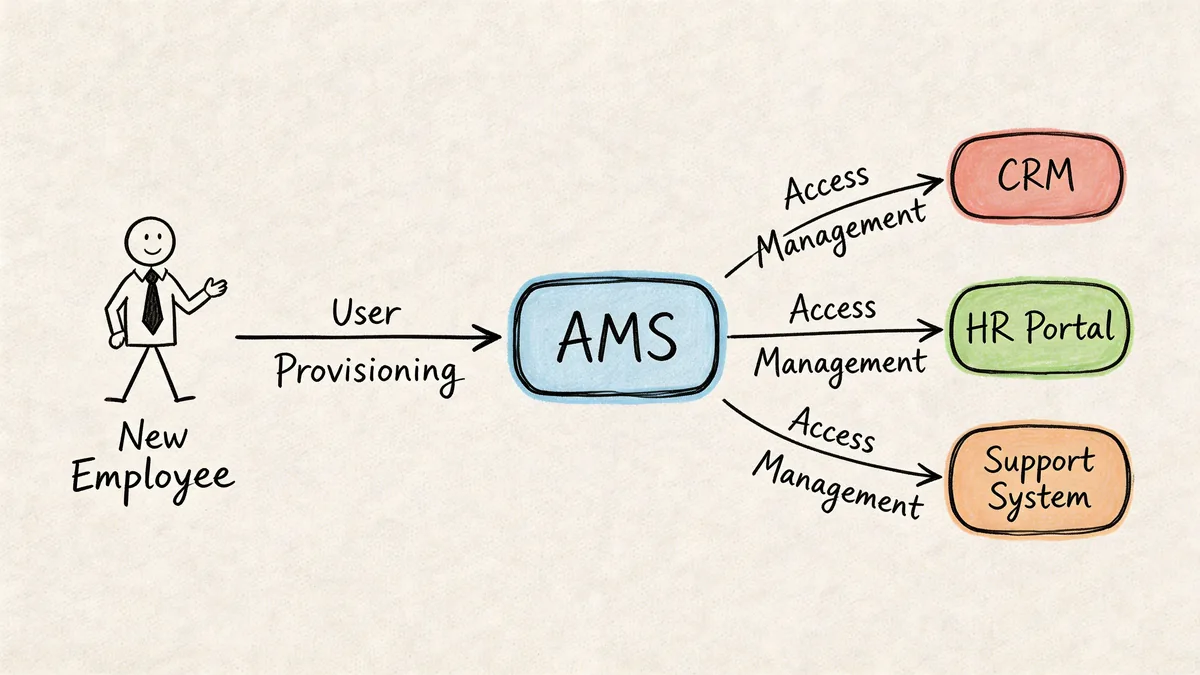
A new support rep joins. They need Zendesk access on day one.
In weak environments, someone sends a Slack message, an admin creates the user, picks the nearest-looking role, and moves on. Nobody checks whether the rep needs a paid seat yet, or whether training access would do for the first phase.
In a managed workflow, provisioning starts with business need. Team, role, start date, queue ownership, and approval are all defined before the seat is assigned. That cuts back on “temporary” licenses that stay active for months.
Reviewing access before it turns into clutter
Access reviews are where a lot of savings live.
People change jobs, cover projects, backfill managers, or keep privileged access after an incident. Zendesk rarely gets cleaned up at the same speed as the org chart. A quarterly review catches stale admins, inactive agents, and users who should be downgraded or removed.
Short list of what to check during a review:
- Role fit: Match Zendesk permissions to the person’s current job.
- Activity pattern: Check whether licensed agents still work tickets regularly.
- Manager sign-off: Make team leads confirm the seat is still needed.
- Exception cleanup: Remove “temporary” access that never got revisited.
Deprovisioning on exit or transfer
Here, cost and operational risk meet.
When someone leaves, disabling SSO isn’t enough. You still need to deal with their Zendesk footprint. Open tickets may need reassignment. Views or automations tied to that user may need a new owner. Historic data may need to stay intact while the paid seat goes away.
If a person moves to another department, the same issue applies. They may still exist in your identity system, but that doesn’t mean they still need a Zendesk license.
Offboarding should free the seat on the same day the business need ends. If it lingers, the license becomes a recurring charge with no owner.
Monitoring usage and catching drift
The most mature teams don’t wait for renewal season. They monitor for drift all year.
Modern application management systems focus on proactive performance optimization. By continuously monitoring usage and baseline activity, they can catch anomalies such as unused licenses or performance issues before they hit users or budgets, as described in Kellton’s overview of application managed services.
That matters because software estates are already crowded. High-performing IT teams keep application deployment failure rates at 5-15%, while medium performers sit at 15-45%, according to Numecent’s review of application management metrics for enterprise IT teams. The same source notes that the average company is juggling 342 SaaS apps. More apps means more chances for access drift, orphaned seats, and broken handoffs between HR, IT, and app admins.
What good workflow control looks like
You don’t need a huge platform to get the basics right. You need consistent triggers and ownership.
A workable model looks like this:
| Workflow | Trigger | Owner | Budget impact |
|---|---|---|---|
| New agent setup | Approved hire or role change | Zendesk admin with manager approval | Prevents unnecessary early seat assignment |
| Access review | Scheduled review cycle | IT or operations lead | Finds stale paid access |
| Offboarding | HR exit or transfer event | IT plus Zendesk admin | Frees seats quickly |
| Usage monitoring | Ongoing activity checks | Ops or finance partner | Flags waste before renewal |
Organizations don’t fail because they lack data. They fail because no workflow connects the data to an action.
The Real-World Benefits for Your Team
If you’re explaining application management systems to Finance, skip the language about maturity models and service layers. Talk about fewer surprises, cleaner approvals, and lower recurring spend.
That's the true return.
For IT managers
A managed approach cuts admin churn.
Your team spends less time chasing “does this person still need access?” tickets and more time on actual system work. It also makes audits easier because role assignment, access changes, and removal decisions follow a repeatable path instead of living in inboxes and side chats.
The operational upside is consistency. New hires don’t wait around for access. Departed users don’t stay licensed by accident. Admin rights get reviewed before they become permanent exceptions.
For operations leaders
Support operations feel the difference fast.
When onboarding is controlled, new agents get the right queue access and macros without a lot of rework. When offboarding is handled properly, ticket ownership gets reassigned instead of disappearing into a dead account. Queue coverage stays intact because removing waste doesn’t mean removing necessary capacity.
That’s the trade-off people often miss. Good AMS practice isn’t about stripping licenses aggressively. It’s about removing the seats nobody is using, while protecting the seats that keep the support floor running.
The best cost control in Zendesk comes from cleaner decisions, not harsher ones.
For finance teams
Finance gets something it rarely has with SaaS. Evidence.
Instead of debating whether the Zendesk count “feels high,” you can tie paid seats to actual need and recent activity. That changes renewal discussions from negotiation theater into a line-by-line review of what should stay, what should go, and what needs closer monitoring.
Zendesk pricing is a good example because the math is visible. Annual billing rates are Suite Team $55, Growth $89, Professional $115, and Enterprise $169+ per agent per month. If you find 10 unused Professional licenses, that is $13,800 per year in avoidable spend. The formula is direct: $115 x 10 x 12.
Here’s the same logic across common Zendesk tiers:
| Zendesk plan | Price per agent per month | 10 unused seats per year |
|---|---|---|
| Suite Team | $55 | $6,600 |
| Growth | $89 | $10,680 |
| Professional | $115 | $13,800 |
| Enterprise | $169+ | $20,280+ |
That’s why proactive monitoring matters. You don’t need to wait for a contract event to spot waste. Continuous usage reviews can surface inactive agents, role mismatches, and dormant paid seats before another billing cycle passes.
What works and what doesn’t
What tends to work:
- Named ownership: One team owns the review and removal process.
- Clear inactivity rules: Everyone agrees what “unused” means.
- Manager confirmation: Seat decisions stay tied to business need.
- Ongoing checks: Problems are caught before renewal panic starts.
What usually doesn’t:
- Annual cleanup only: Waste sits all year, then gets rushed.
- Spreadsheet dependence: Exports age quickly and miss changes.
- Loose approvals: Seats get added faster than they get reviewed.
- Fear-based retention: Teams keep extra licenses because nobody trusts the data.
The value of application management systems is that they turn software from a fixed overhead line into something you can govern.
How to Evaluate and Implement an AMS Strategy
Most mid-market companies don’t need a giant transformation. They need a usable operating model that their current team can keep running.
That’s why the first decision isn’t technical. It’s practical. Are you going to manage Zendesk and the rest of your app estate with manual controls, or do you need automation where the waste is hardest to see?
Start with your constraints
There’s a real talent problem behind a lot of software overspend.
Rimini Street notes that an ERP talent shortage is already causing problems, and that the lack of internal expertise often leaves teams unable to run accurate software asset audits in its discussion of new AMS models for the IT talent shortage. In practice, that shows up as a very familiar behavior. Teams keep the current license count because changing it feels risky and nobody has time to validate the alternative.
If your Zendesk admin is already stretched, adding a manual audit process every month probably won’t stick.
Questions worth asking before you pick an approach
A good AMS strategy should survive normal team turnover and busy periods. If it only works when one expert has time to babysit it, it’s fragile.
Use these questions to pressure-test your approach:
- Integration fit: Does it connect to Zendesk and your identity systems cleanly?
- Security posture: Does it use limited access, such as read-only API access where possible?
- Operational burden: Can your existing admin or ops team run it without specialist help?
- Actionability: Does it just report usage, or does it support real seat decisions?
- Review cadence: Can it support ongoing checks, not just one-off audits?
For teams reviewing broader options, LicenseTrim has a useful overview of application portfolio management solutions.
Manual versus automated audits
Many organizations start with spreadsheets because they’re available. That’s fair. The problem is repeatability.
Here’s the trade-off in plain terms:
| Factor | Manual Audit (Spreadsheets) | Automated Tool (e.g., LicenseTrim) |
|---|---|---|
| Time to run | High admin effort every cycle | Low ongoing effort after setup |
| Data freshness | Point-in-time export | Ongoing monitoring |
| Accuracy risk | High, depends on manual cleanup | Lower, based on system data |
| Audit consistency | Varies by owner and timing | Repeatable rules |
| Response speed | Usually tied to renewal season | Can flag issues between renewals |
| Team dependency | Often relies on one knowledgeable admin | Easier to share across ops and finance |
| Cost visibility | Hard to quantify seat waste quickly | Easier to map inactivity to spend |
Build enough process to be usable
Don’t overdesign this.
A practical AMS strategy for Zendesk usually needs four things:
- A clean source of truth for licensed users
- A definition of valid activity
- A review owner
- A removal process that won’t disrupt support
That’s enough to move from reactive cleanup to managed control. Anything beyond that should earn its keep.
Where Specialized Tools Fit into Your Strategy
A lot of AMS platforms are broad by design. They cover performance, security, service support, and a long list of applications. That breadth has value, especially in larger environments.
It also leaves a gap.
The AMS market is fragmented, and large providers often focus on security and operational management while overlooking integrated cost governance for specific SaaS tools, as noted in Tech Market Experts’ analysis of the AMS market. That’s exactly why teams can know Zendesk is expensive and still struggle to act on it.
Broad platform versus focused cost control
If your biggest issue is inactive Zendesk agents, a large AMS initiative may be more than you need.
A focused tool can fit into your strategy as a targeted control. It doesn’t replace your whole application management model. It handles one expensive problem well: identifying idle seats, showing the cost of keeping them, and giving admins evidence to clean them up.
That’s often the right trade-off for mid-market teams. You get movement on a real line item without waiting for a full enterprise program.
Why point solutions can still make sense
Point solutions get criticized for being narrow. Sometimes that criticism is fair.
But narrow can be useful when the business case is clear. Zendesk license waste is a contained problem. You know the platform, the users, the billing model, and the likely owner. A specialized tool can help where generic dashboards stop short.
If you’re comparing categories, LicenseTrim’s roundup of SaaS spend management tools is a helpful place to frame the options.
A focused tool earns its place when it reduces a recurring cost faster than a broad platform can.
The key is to treat it as part of your AMS strategy, not as a substitute for governance. You still need ownership, review rules, and a process for removing seats without hurting support coverage.
Your Plan Before the Next Zendesk Renewal
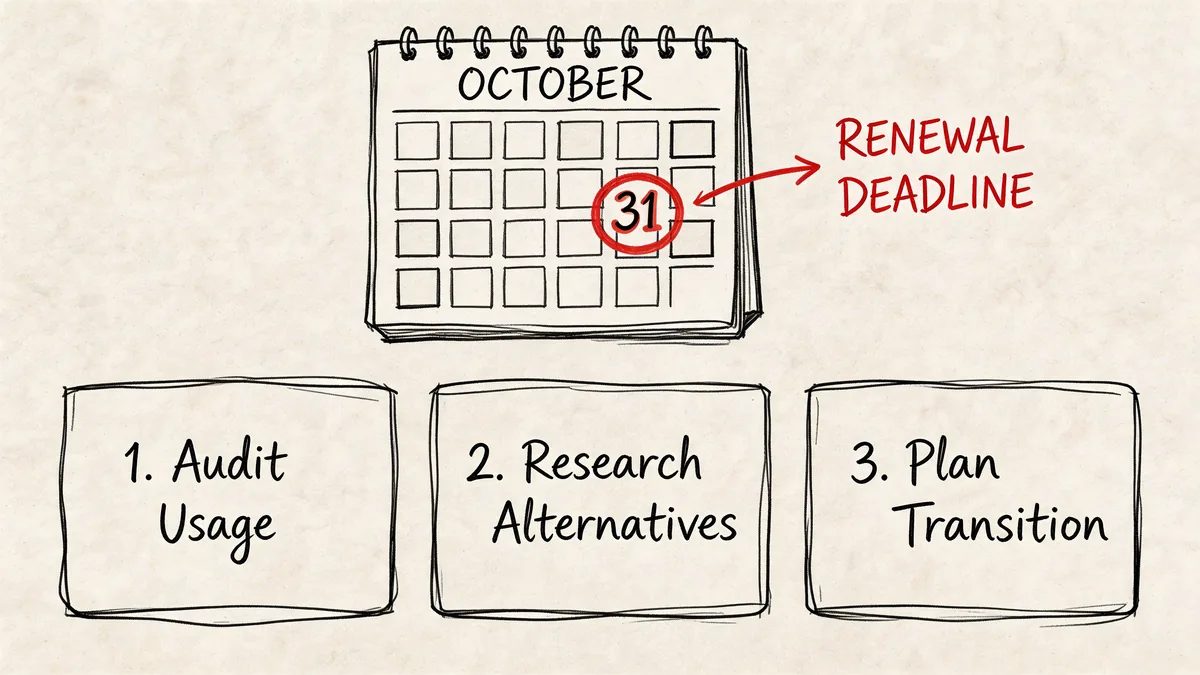
Renewal dates create urgency because they force a decision. Keep paying the current count, or prove why it should change.
If you wait until the invoice draft arrives, you’ll rush the audit and keep more seats than you need. If you start earlier, you can clean up with less risk.
Step 1 gets you the real user list
Pull a definitive list of everyone holding a Zendesk license.
Don’t rely on memory, old exports, or manager assumptions. Start with the actual licensed users in the system. Then mark obvious exceptions such as recent hires, approved backups, and temporary coverage roles that still have a valid business reason.
Step 2 defines what inactive means for your team
You need a rule before you need a report.
For some teams, inactivity means no ticket interaction over a set period. For others, it may include no recent login, no ticket updates, or no assigned queue work. The exact rule depends on how your support operation runs.
Write it down and get agreement from support leadership and Finance. If the rule changes every time a manager objects, the audit won’t hold.
Step 3 compares licensed users against activity
Now run the review.
Match your licensed user list against the activity rule. Anyone who fails the test goes into one of three buckets:
- Remove: No longer needs a paid seat
- Downgrade or monitor: Edge case that needs a lighter touch
- Keep with justification: Active business reason documented by the manager
That gives you a clean renewal position. Not “we think we can cut a few seats,” but a reviewed list with decisions attached.
Don’t confuse renewal prep with vendor strategy
Sometimes the right move is better license governance. Sometimes it’s a platform change.
If your broader support stack is under review, this comparison of top Zendesk competitors can help you separate pricing frustration from product fit. That’s a different conversation from seat waste, and it helps to keep them separate.
Clean up your current licensing before you evaluate replacement options. Otherwise you’re comparing vendors using inflated baseline costs.
Application management systems matter because they make software spend reviewable. They give IT, Ops, and Finance a shared process instead of separate opinions.
If your next Zendesk renewal is coming up, don’t start with negotiations. Start with usage.
If you want a faster way to audit Zendesk seats, LicenseTrim connects via OAuth, checks real agent activity, and shows where inactive licenses are wasting money. It’s a practical way to turn renewal prep into an evidence-based cleanup instead of another spreadsheet exercise.