
Meta description: Your CRM says Closed Won, finance says unpaid. Learn how to choose the right HubSpot Stripe integration for your billing model.
A rep marks a deal as Closed Won in HubSpot. Finance checks Stripe and sees an invoice still open. Customer success asks whether onboarding should start. Nobody trusts the dashboard, so the team falls back to Slack threads, spreadsheet checks, and “can you confirm payment?” emails.
This is the core reason teams look for a hubspot stripe integration. It’s not about connecting two apps for the sake of it. It’s about stopping the constant argument over what occurred, sold, invoiced, paid, failed, renewed, or churned.
Your Sales and Finance Data Is a Mess. Here’s Why.
A lot of teams have the same split-brain setup. Sales works in HubSpot. Finance works in Stripe. Both think they own the truth.
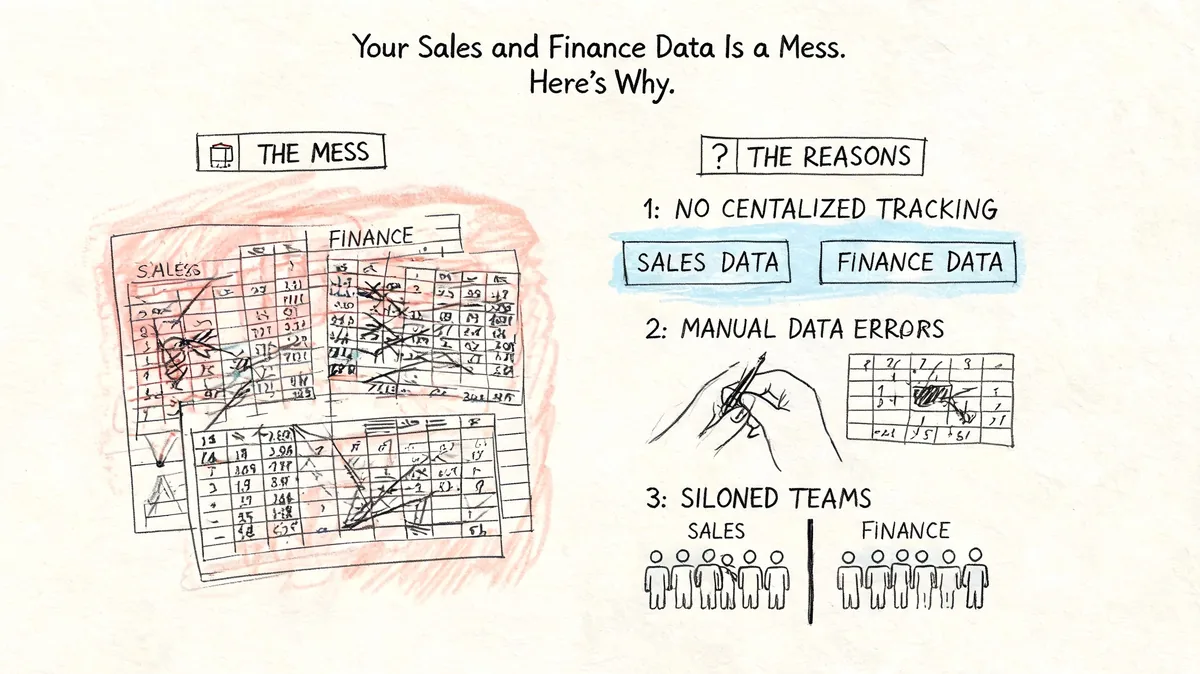
Closed won does not mean cash collected
Here’s the failure pattern I see most often. A deal gets pushed forward because the customer agreed to buy. But the invoice is still pending, the card fails, or the subscription never gets created correctly. Sales thinks the account is live. Finance knows the money hasn’t landed.
When HubSpot and Stripe aren’t tied together properly, your team starts making operational decisions on partial data. That creates bad handoffs, messy forecasts, and extra work every month-end.
HubSpot-Stripe data sync fixes that gap when it’s set up well. Stripe invoices can map to HubSpot deals, paid invoices can move deals to Closed Won, and failed payments can trigger a Payment Failed stage, which gives finance and RevOps a clearer view of pipeline-to-cash conversion and collection behavior, as described in this HubSpot-Stripe synchronization assessment.
If your team has to compare HubSpot and Stripe by hand before every forecast call, your process is already broken.
The mess usually shows up in the same places
You can spot the problem fast if any of these sound familiar:
- Forecast reviews drift into payment checks because booked revenue and collected revenue don’t line up.
- Renewals get missed because no one owns the transition from active subscription to upcoming invoice.
- Failed payments sit too long because Stripe alerts never reach the team working in HubSpot.
- Churn reasons stay vague because cancellation data lives outside the CRM.
- Customer history feels incomplete because sales sees deals, while finance sees invoices and subscriptions.
None of that is rare. It’s what happens when the CRM tracks intent and the billing system tracks money, but nobody designed how the two should work together.
Why this becomes a RevOps problem fast
Once billing data stays separate, reporting gets shaky. MRR, ARR, CLV, churn, and NRR all depend on subscription and payment records being aligned. If they aren’t, your board deck, forecast, and renewal planning all start from the wrong baseline.
That’s why a HubSpot Stripe integration isn’t a “nice to have” for subscription businesses. It’s the control point between what your team sold and what your company collected.
Understanding Your HubSpot Stripe Integration Choices
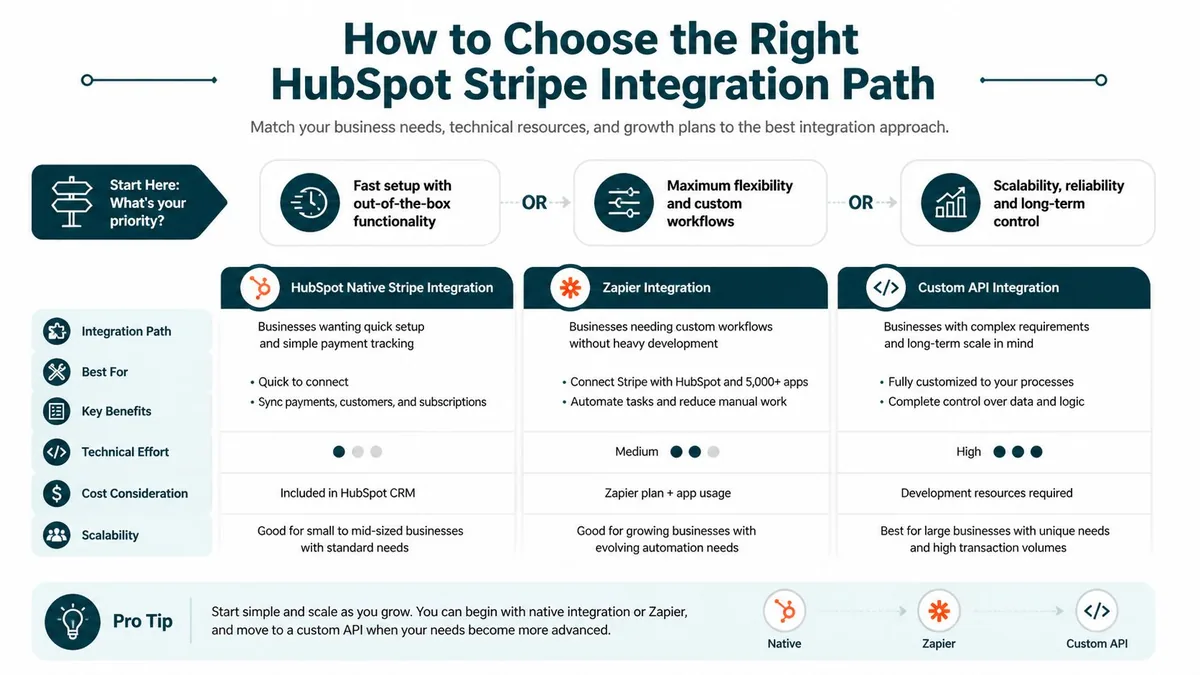
There are three ways to connect HubSpot and Stripe. The right one depends less on your tech stack and more on your billing model.
HubSpot’s Stripe partnership is built on Stripe Connect and supports two-way sync across several object types. Stripe Customers sync to HubSpot Contacts, Stripe Invoices map to HubSpot Invoices, and Subscriptions sync to Custom Objects, with historical migration and real-time updates supported, according to Stripe’s HubSpot customer page.
Native integration
A native integration is the built-in or marketplace approach. You connect the platforms, authorize access, and use the vendor’s standard object mappings and sync logic.
That’s the fastest path when your billing model is predictable. It works best when you want common records synced without a lot of custom transformation.
Typical use cases include:
- Customer syncing between Stripe and HubSpot contact records
- Invoice visibility inside HubSpot for sales and finance teams
- Subscription tracking on customer records for lifecycle workflows
- Historical import so old billing data appears without manual backfill
The trade-off is control. Native setups are opinionated. If your data model is unusual, you’ll hit limits fast.
Middleware
Middleware sits between the two systems. Think Zapier, Make, or iPaaS tools that listen for events in one app and create or update records in the other.
It’s useful when the native route almost fits, but not quite. Maybe you need a payment failure to trigger a HubSpot workflow. Maybe you want a renewal event to create a task, update a custom property, and notify finance.
Middleware usually gives you:
| Method | Best for | Main upside | Main risk |
|---|---|---|---|
| Native app | Standard billing flows | Faster deployment | Less flexibility |
| Middleware | Event-based workflows | More control without full custom build | Logic can sprawl |
| Custom API | Complex billing models | Full control over data design | More implementation and maintenance work |
Custom API integration
Custom API work is for teams that know the default object mappings won’t hold up. You define the source of truth, the sync direction, error handling, and how custom objects relate to subscriptions, invoices, products, or payment events.
That path takes more planning. It also saves a lot of cleanup later when billing is complex enough that generic sync logic starts corrupting reporting.
Practical rule: If your team says “we just need a few custom exceptions,” document those exceptions before you pick the tool. They usually decide the whole architecture.
How to Choose the Right HubSpot Stripe Integration Path
The wrong choice usually happens when a team buys based on setup speed instead of billing complexity. A one-time payment business and a SaaS company with upgrades, downgrades, renewals, and failed retries should not use the same integration design.
Research from ClearSync’s billing integration analysis points out where DIY webhook setups break down. Companies with usage-based billing, multi-currency transactions, prorations, failed payment retries, and historical subscription context often run into integration failures and MRR reporting errors.
Match the method to the billing model
Here’s the decision framework I use.
| Integration path | Fits best when | Usually works well for | Usually breaks when |
|---|---|---|---|
| Native | You sell one-time payments or standard recurring subscriptions | Smaller teams that need visibility inside HubSpot without heavy customization | Billing logic includes prorations, hybrid pricing, or unusual object relationships |
| Middleware | You need cross-system actions and custom workflow triggers | Teams that want operational automation without building an API layer | Event chains get too complex and nobody owns maintenance |
| Custom API or specialized middleware | Stripe is the billing system of record and billing logic is complex | SaaS and RevOps teams handling usage-based, seat-based, hybrid, or multi-currency billing | Internal ownership is weak and no one can maintain the integration |
What usually works
Native is fine if your process is clean. The customer buys, Stripe charges, HubSpot needs status updates, and your reporting needs are modest.
Middleware works when the core sync is acceptable but your handoffs need work. Payment fails, renewal notice, task assignment, deal stage change, and customer email all happen because you built the logic around them.
Custom work is the safer route if revenue accuracy depends on preserving billing nuance. If your finance lead cares about historical subscription state, retries, mid-cycle changes, and currency handling, don’t force that into a lightweight event tool.
What usually does not
Teams get into trouble when they assume “sync” means “accurate reporting.” It doesn’t. A record can sync and still be wrong for RevOps use.
Common mistakes:
- Choosing native for complex SaaS billing and then patching every exception by hand
- Using middleware as a data warehouse instead of as workflow glue
- Skipping ownership so nobody monitors failed syncs or duplicate logic
- Ignoring historical context and only syncing current status
- Treating MRR as a field copy problem when it’s a billing logic problem
If your environment already has edge cases, take a look at broader SaaS integration software options before locking yourself into the first app in the marketplace.
Don’t choose the tool your admin can connect fastest. Choose the design your finance team can trust six months from now.
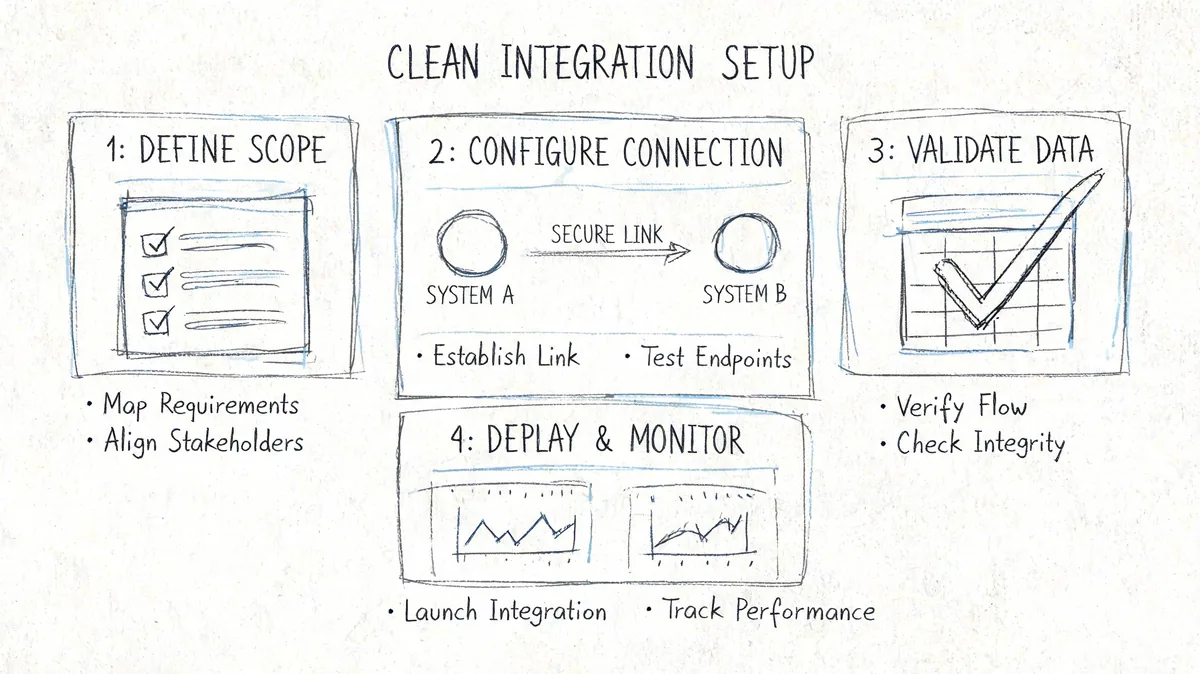
Key Steps for a Clean Integration Setup
A clean setup starts with one critical decision often made too late: Which system owns billing truth.
According to Campaign Creators’ RevOps integration guide, enterprise teams usually choose between HubSpot Commerce Hub, where HubSpot acts as the billing engine and Stripe serves as the payment gateway, or Stripe Data Sync, where Stripe remains the billing system of record and HubSpot mirrors the data. That same guide also recommends configuring transaction settings and running test transactions before go-live.
Connection
If HubSpot will drive billing, use Commerce Hub logic. If Stripe already handles subscriptions, invoicing, retries, and billing edge cases well, keep Stripe as the system of record and sync into HubSpot.
That choice affects everything after it. Reporting, workflow triggers, audit trails, and support ownership all depend on it.
A few practical rules help here:
- Pick one source of truth for invoices and subscriptions
- Use dedicated credentials tied to admin-owned accounts, not personal logins
- Limit permissions to what the integration needs
- Test in a controlled flow before exposing it to live customer records
Mapping
Bad mapping causes most downstream cleanup. You need to define how Stripe customers, invoices, transactions, products, and subscriptions relate to HubSpot records before the first sync runs.
I’d map based on reporting needs first, not convenience. If finance wants invoice-level reporting and sales wants account-level visibility, design for both. Don’t just accept the default because it exists.
Useful mapping questions:
| Mapping question | Why it matters |
|---|---|
| Which field uniquely identifies the customer across both systems | Prevents duplicate records |
| Where should subscription status live in HubSpot | Drives lifecycle workflows |
| Which record owns payment failure status | Decides who gets alerted and when |
| How will you store churn reason | Makes retention reporting usable |
| Do products need to sync as reporting objects or sales references | Changes your object model |
Configuration
At this stage, teams either prevent leakage or create it. Configure currencies, payment methods, notifications, and workflow logic with real operating scenarios in mind.
For example, if a payment fails, what happens next. Does the deal move stages. Does a task open for CSM. Does finance get notified. Does the contact enter a dunning flow. If none of that is defined, the integration is connected but not operational.
You should also decide how renewals get handled. Some teams create renewal deals on schedule. Others manage the subscription in Stripe and only push status and invoice outcomes into HubSpot. Both can work. The wrong move is mixing both models without a clear rule.
For teams thinking beyond setup and into governance, this is the same discipline used in SaaS subscription management. Ownership matters more than tooling.
A clean integration doesn’t just move data. It tells each team what to do next when the data changes.
Putting Your Integrated Data to Work
A live sync only matters if it changes what your team does day to day.
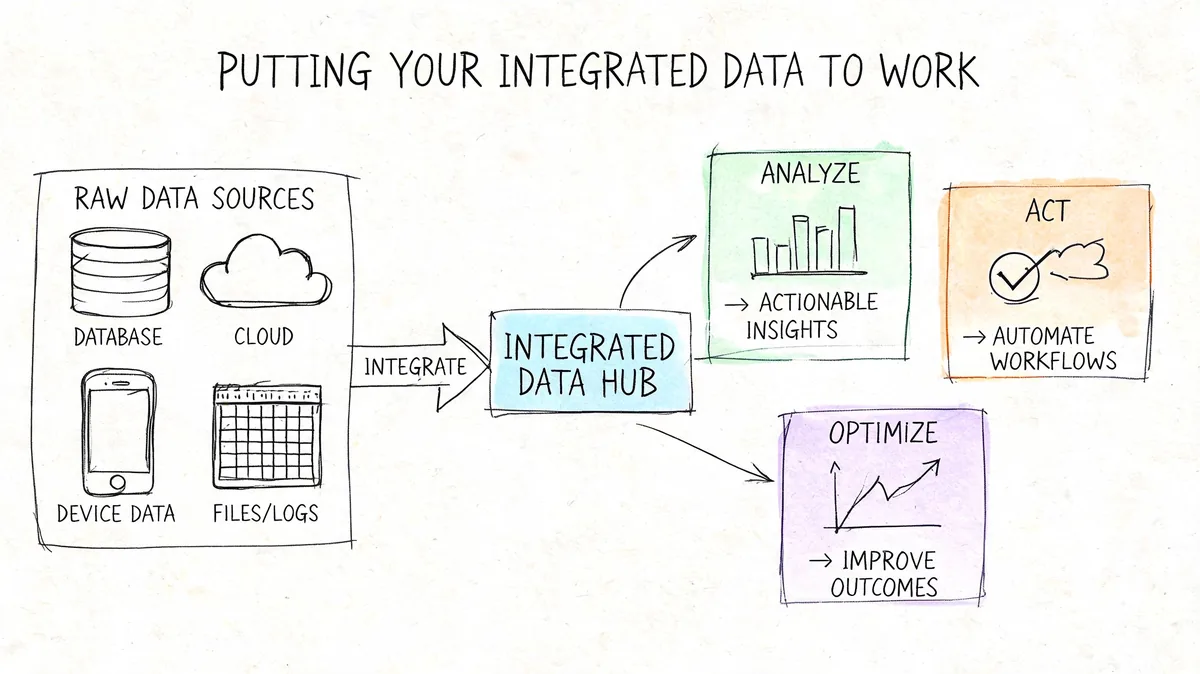
The practical test is simple. Can sales, finance, and customer success act from the same customer record without checking Stripe in one tab and HubSpot in another? If not, you have connected systems, not an operating workflow.
Sales gets cleaner handoffs
For sales and onboarding teams, payment confirmation should settle the handoff. A paid invoice or successful subscription charge can update the deal, stamp the customer lifecycle stage, and trigger onboarding only when revenue is collected. That removes the usual back-and-forth over whether a customer is really ready to launch.
The right setup depends on your billing model. For one-time payments, the useful trigger is usually invoice paid. For recurring SaaS, it is often first payment succeeded, renewal due, payment failed, or subscription canceled. Teams that try to force all of those events into one generic deal stage usually end up with reporting that looks clean but does not reflect how the account is billed.
Good use cases include:
- Post-payment onboarding that starts after confirmed payment
- Expansion targeting based on active products, plan tier, or past purchase history
- Renewal prep based on subscription dates and risk signals, not rep memory
Finance gets faster recovery loops
Finance usually gets the most immediate payoff because failed payments stop sitting in Stripe until someone reviews them manually.
A useful recovery flow is straightforward. Stripe records the failed charge. HubSpot updates the contact, company, or subscription properties your team uses for follow-up. A task goes to the right owner. The customer enters the right dunning or account-review process based on plan type and account value.
That last part matters. A native integration can be enough for simple billing. If you run usage-based billing, multi-entity finance, or complex retries, middleware or custom logic often does a better job because you can separate customer messaging from internal escalation. Otherwise, teams tend to send the same response to a small self-serve account and a large annual contract, which is usually the wrong move.
The integration is doing its job when a failed payment creates a clear next action for the right team.
Leadership gets reporting that matches reality
Leadership does not need more CRM fields. Leadership needs reporting that lines up with how the business charges customers.
That is why the integration method matters beyond setup. A native sync can cover basic payment visibility. Middleware is often the better fit when leadership wants cleaner reporting across subscriptions, invoices, and lifecycle stages without building and maintaining custom code. Custom integrations make sense when pricing logic is unusual enough that off-the-shelf mappings break down.
If your team is reviewing packaging, retention, or expansion strategy, the reporting gets much easier to trust when your CRM and billing model are designed together. That is especially true for companies refining their subscription-based pricing model, because plan structure, renewal logic, and payment events all shape what shows up in HubSpot.
How to Validate and Maintain Your Integration
Go live only after you’ve tested a full billing cycle, not just the connection screen.
Run a controlled set of checks with test transactions. Create the customer, create the invoice or subscription, complete a successful payment, trigger a failed payment, and verify what appears in HubSpot. Check the record links, stage movement, custom properties, and notifications. If your process includes renewals or cancellations, test those too.
Common issues to catch early
- Duplicate contacts or companies usually come from weak matching rules or inconsistent source IDs.
- Missing payment updates often trace back to incomplete event handling or permission gaps.
- Wrong deal or invoice status usually points to mapping logic that looked fine in setup but failed under a real billing scenario.
Security and ownership matter after launch as much as they do during setup. Use dedicated integration credentials, keep permissions tight, and assign one person to own sync health. Without an owner, broken workflows can sit unnoticed while the team assumes the system is fine.
Your first action item
Audit your billing model before you pick the integration method.
Write down whether you have one-time payments, recurring subscriptions, usage-based charges, multi-currency billing, prorations, failed retry logic, and renewal workflows. That list will tell you more than any app marketplace description ever will.
If your team also struggles with wasted SaaS spend outside billing ops, LicenseTrim is worth a look. It connects to Zendesk, flags inactive agents, and shows how much money is tied up in unused licenses so you can clean up waste without another spreadsheet audit.